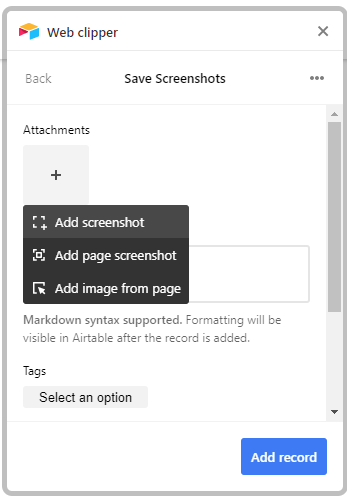
Webclipper page screenshot without the scroll bar

  • April 9, 2021
  • 2 replies
  • 35 views

Hey,

Webclipper is great but it keeps the browser scrollbar when I take a page screenshot. Is it possible to not have it ?

Also, is it possible to choose the size of the image that is taken and upload into the airtable base?

Thanks

This topic has been closed for replies.

2 replies

  • Participating Frequently
  • April 9, 2021

I’m sure this is something the development team is working on. In the meantime, you could always use a screenshot app that has the functionality you require and then paste the screenshot into an attachment field.


Jenna_Moakley
Forum|alt.badge.img+6
  • Participating Frequently
  • April 19, 2021

There should be 3 options when taking a screenshot. As displayed in the screenshot below.

You’re looking for the first option.

  • Add screenshot (freestyle - meaning you can choose specific area and what to include or not)
  • Add page screenshot (automatically screenshots the page you’re viewing)
  • Add image from page (if there are any images within the page, you can add it to your attachments)