Question

New Release! Show display name instead of primary field for linked record fields

  • December 19, 2025
  • 17 replies
  • 305 views

Mike_AutomaticN
Forum|alt.badge.img+28

Hey guys!!

Just figured out this is new and super cool (see screenshot below). Thought it would be nice to share as I don’t seem to find it in Airable’s what’s new page.
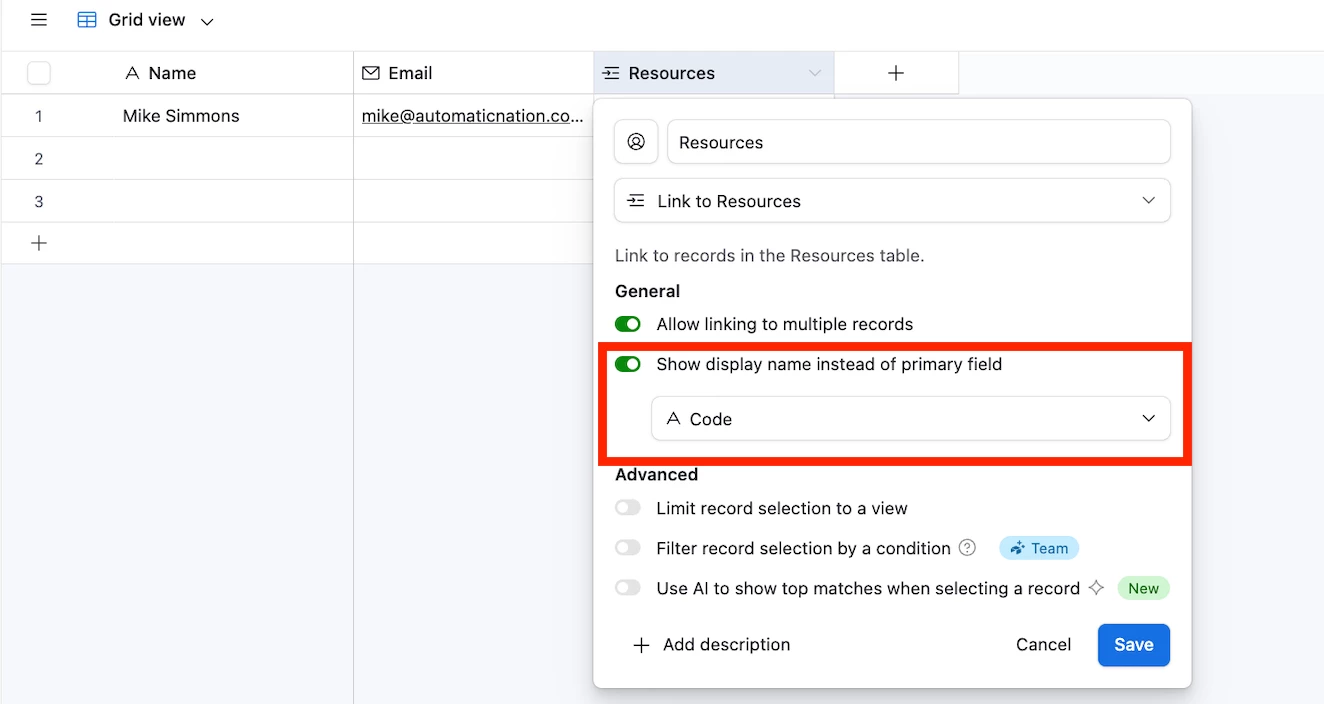



@ScottWorld ​@DisraeliGears01 where you guys aware of this? Was this released some days ago and I didn’t realize?
 

Mike, Consultant @ Automatic Nation 
YouTube Channel

17 replies

ScottWorld
Forum|alt.badge.img+35
  • Genius
  • December 20, 2025

Thanks for posting about this, ​@Mike_AutomaticN !

Yes, I just found out about this yesterday in the BuiltOnAir Slack community!

This is huuuuge!

We still need the ability to search linked records by more than one field, but besides that longstanding problem, this is gigantic news!

People have been wanting this since the very beginning!

It always cracks me up how Airtable never mentions any of their biggest improvements to the product — the real game-changing features — but they’ll spend 24/7/365 talking about any feature that is AI-related. 🤷🏻‍♂️😂🤣

We need Airtable to give us a REAL changelog.

- ScottWorld, Expert Airtable Consultant 


Mike_AutomaticN
Forum|alt.badge.img+28

Nice!! We might want to assess building a changelog ourselves then. Might not get releases published immediately, but I’m sure we’ll get to spot and track most of them pretty fast. 


VikasVimal
Forum|alt.badge.img+12
  • Inspiring
  • December 20, 2025

It is really cool!

Airtable only publishes features on the website after like 70% adoption. And Airtable is known to release features progressively. The new UI, I had access to it through one of my clients probably within the first week of its launch, but my personal Airtable account didn’t get it till over 1 month later. I suspect it’ll be in an email after everyone already knows about it.


Mike_AutomaticN
Forum|alt.badge.img+28

Interesting, that makes sense ​@VikasVimal!!

Thanks for sharing!


ScottWorld
Forum|alt.badge.img+35
  • Genius
  • December 21, 2025

@VikasVimal That is very true that they often wait to post about the features that they decide to post about, but they still don’t post about most of the changes that they make to the product.

They make tons of little changes and bug fixes on a weekly basis that never go announced.

Unlike most other apps, Airtable has no official changelog.

So ​@Mike_AutomaticN , I think your idea is fantastic for Airtable customers to create and maintain our own changelog!

Of course, we’ll never know about all the bug fixes, but with enough eyeballs, we can figure out most of the product improvements.

I can start an ongoing public changelog thread on TableForums, just like I started with the ongoing feature request list that Airtable actually follows and reviews!

- ScottWorld, Expert Airtable Consultant 


DisraeliGears01
Forum|alt.badge.img+21

It always cracks me up how Airtable never mentions any of their biggest improvements to the product — the real game-changing features — but they’ll spend 24/7/365 talking about any feature that is AI-related. 🤷🏻‍♂️😂🤣

- ScottWorld, Expert Airtable Consultant 

💯💯💯

Yeah, I found out about it on Wednesday or Thursday from BoA Slack. I think ​@VikasVimal is right that they do phased rollouts and so they stay quiet about some releases.

Just noticed in the official changelog that you can intermix repeating groups, conditionals, and apparently conditionals in conditionals now in Automations, another huge change. 

While I don’t particularly care for all the AI hype train, hard to argue that we got some major structural upgrades this year with selectable linked record display names, table backlinks, and better automation conditionality (and shoot I’m easy to please, dark mode is very much appreciated). 


Mike_AutomaticN
Forum|alt.badge.img+28

Wait ​@DisraeliGears01. What??? You can do that with automations now!? That is HUGE. I’ll be double checking if that has been rolled out on my side as soon as possible (currently on my phone). 
 

Mike


QuietData
Forum|alt.badge.img+3
  • New Participant
  • December 28, 2025

Is there documentation on how to use it yet? I have several linked records and different field types, but nothing shows up for me as an option to choose for what to use instead of the record name.


Mike_AutomaticN
Forum|alt.badge.img+28

Hey ​@QuietData!

I dont’t think there is any documentation yet. From a quick look at it, probably amongst a few others, it allows me to choose from:

  • Single line text fields
  • Long text fields
  • Currency fields
  • Number fields
  • Formula fields
  • Duration fields


It doesn’t seem to work, probably amonst a few others, for:

  • Lookup fields
  • Rollup fields
  • Linked record fields
  • Single select fields
  • Multiple select fields


You can always have a formula reference any of the non-supported fields, and then just choose your new formula field to display.

Hope this helps!

Mike, Consultant @ Automatic Nation 
YouTube Channel


chloe-elizabeth
Forum|alt.badge.img+5
  • Participating Frequently
  • January 12, 2026

Has anyone tested using linked fields using a display name within a formula yet?

I’ve tested by inputting a field reference into the formula, but this seems to still output the primary field name of that record instead of the display name. I wonder if there is a formula function that would work to output the chosen display name instead… 🤔


ScottWorld
Forum|alt.badge.img+35
  • Genius
  • January 12, 2026

@chloe-elizabeth 

Oh wow, that’s a very interesting — and very disappointing — discovery.

This feels like it must be a bug.

I would definitely write to support@airtable.com about this, and hopefully they’ll fix this behavior in the near future.

(Unfortunately, Airtable never updates their formulas with new functions, which really limits Airtable’s power and potential… so really the only hope of getting this resolved is to convince support that this is a bug and hopefully they will fix it.)

- ScottWorld, Best Airtable Consultant


ScottWorld
Forum|alt.badge.img+35
  • Genius
  • January 12, 2026

p.s. Although I guess the easy workaround would be to just go back to the old method of doing this, which is to use lookup fields for your formula field.


chloe-elizabeth
Forum|alt.badge.img+5
  • Participating Frequently
  • January 12, 2026

p.s. Although I guess the easy workaround would be to just go back to the old method of doing this, which is to use lookup fields for your formula field.

Yep that’s what I’ve got for now, thanks!

Have asked Airtable support and will update when I hear back.


Mike_AutomaticN
Forum|alt.badge.img+28

OHHHHHHH. Super interesting. Just gave it a shot on my side.

So, for any future reader, point is:
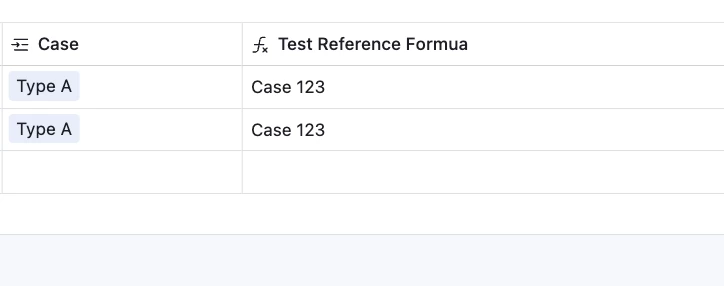
Even set field Type from Cases table as de field to be displayed for Case linked record field (therefore showing Type A on the screenshot below), if I now create a formula which references {Case} field the output will not be Type (field beign displayed) but will actually be the primary field of the linked record!


Thanks for sharing ​@chloe-elizabeth.

Please keep us posted re: any updates from AT.

Mike, Consultant @ Automatic Nation 
YouTube Channel  ​​​​​​​


chloe-elizabeth
Forum|alt.badge.img+5
  • Participating Frequently
  • January 15, 2026

Airtable’s initial auto response was:

Currently, when you reference a linked record in a formula field, Airtable formulas will always return the value of the primary field of the linked record, not the display name set by the new display name feature. There is no formula function available at this time that allows you to pull through the display name of a linked record instead of its primary field value.

Key points:
- Formula fields reference the primary field of linked records.
- The display name feature does not change formula output.
- No formula function exists to retrieve the display name in formulas.

If you need to display a different value in formulas, consider changing the primary field in the linked table to the value you want to display, or use a lookup field to bring in another field’s value from the linked record.


And then upon a further query I got this response from support:

At this time, there isn’t a timeline or confirmed plan to support using a linked record’s display name directly within formula fields. 

Thank you for taking the time to share your thoughts—requests like this help inform future development, even when there’s no immediate roadmap to point to.


ScottWorld
Forum|alt.badge.img+35
  • Genius
  • January 15, 2026

Thanks for sharing. It’s too bad that they don’t really care about this issue. It certainly makes this new feature significantly less useful or helpful.

- ScottWorld, Best Airtable Consultant


Mike_AutomaticN
Forum|alt.badge.img+28

Also, not a technical guy here, but seems pretty simple to implement :(

Might be wrong though.

Mike, Consultant @ Automatic Nation 
YouTube Channel