Calendar date toggle

  • February 25, 2023
  • 7 replies
  • 72 views

Forum|alt.badge.img+3

Hello all,

I have embedded the calendar feature into my website. However, from my experience so far I've found it impossible to toggle by entering different dates. If I want to go back to 1980 for example, I have to manually press back one month all the way until I reach there. Is there another way around this?

Thank you so much in advance

Kind regards

7 replies

pressGO_design
Forum|alt.badge.img+21

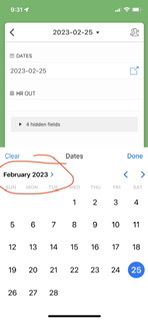
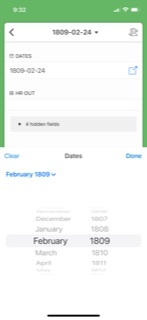
If you click on the month and year in the upper left hand corner of the calendar widget-y thingie, you can scroll back years in the past. I’ve attached screenshots from the mobile app but it works the same way on the desktop app. 


Forum|alt.badge.img+3
  • Author
  • Participating Frequently
  • February 25, 2023

Thank you for your response, perhaps this is the old GUI as this is not the case for the calendar anymore.


pressGO_design
Forum|alt.badge.img+21

It’s not the the GUI, I misunderstood your question. Is the expectation that users will need to scroll back to 1980 to view something in the calendar?


Forum|alt.badge.img+3
  • Author
  • Participating Frequently
  • February 25, 2023

It’s not the the GUI, I misunderstood your question. Is the expectation that users will need to scroll back to 1980 to view something in the calendar?


Yes correct. They currently have to press the back button all the way to 1980. This takes a lot of time. It would be far more convenient if they could type the date or type it in somehow.

im not sure if this is possible. 


pressGO_design
Forum|alt.badge.img+21

The support doc about the sidebar in calendar view might be of some help to you. Scroll down to View Events in a Record List to see how users can find events and jump to specific dates without scrolling through each month.


Forum|alt.badge.img+3
  • Author
  • Participating Frequently
  • February 26, 2023

From my understanding, this is only available on the website directly. It loses the search filter when embedded into a website. I wondered if there are any tools that can help change this.


pressGO_design
Forum|alt.badge.img+21

Unfortunately, there is nothing natively in Airtable that will help with this. If you want people to be able to jump back in time 40 years (and believe me, that sounds extremely tempting to this old bird), I would suggest integrating your calendar with Google and embedding that calendar in your site. If you need them, instructions for how to that are here.