


Hey all,
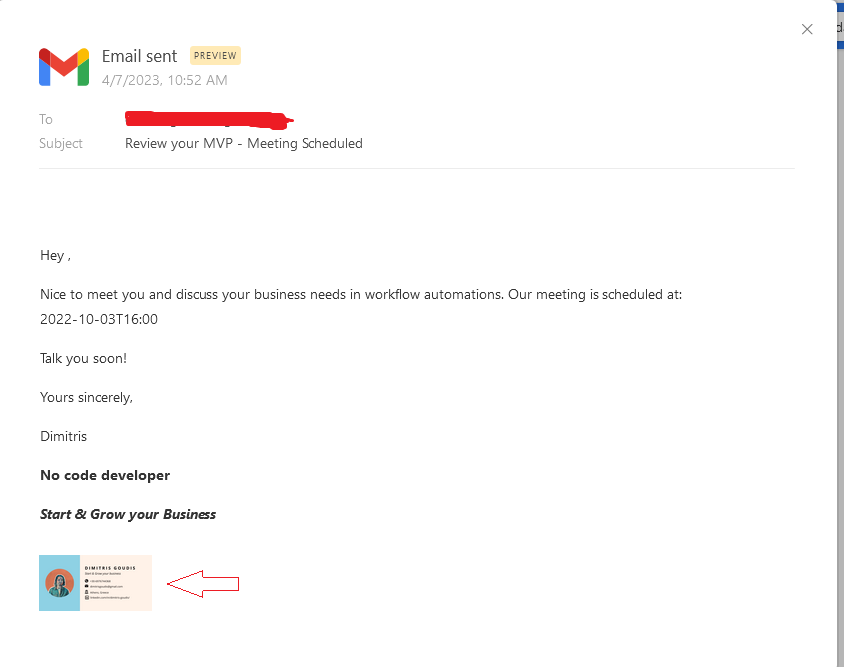
Having a request from a client I found a way to add image in our signatures for email we send using Gmail action in Airtable.
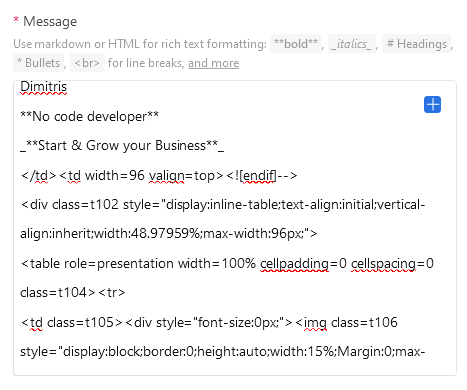
Due to the fact that the image element is not included in Airtable's markdown list we can add it by adding a piece of html code in our action. Below is the code and the explanation of using it.
</td><td width=96 valign=top>

<div class=t102 style="display:inline-table;text-align:initial;vertical-align:inherit;width:48.97959%;max-width:96px;">

<table role=presentation width=100% cellpadding=0 cellspacing=0 class=t104><tr>

<td class=t105><div style="font-size:0px;"><img class=t106 style="display:block;border:0;height:auto;width:15%;Margin:0;max-width:25%;" width={image_width} height={image_height} src={image_public_url}></div></td>
Comments about the code:
- {image_width} & {image_height} are display settings for the image you want to add in your signature. Please keep in mind that those settings are effected also from the table element display settings. So my recommendation here is, "feel free to customize it on your fit" 😎 (example width=50 height=50)
- The {image_public_url} is the public URL for the image. This URL needs to be public so sharing URLs from Google Drive, Drobox etc. will not work. 😭
For those who already have a website, I would recommend to use an image's path from there, it works 100% 😎
Hope this will help you make improvements and create better user experiences. Below are some screenshots from an example. Please feel free to post here any kind of question and any incredible idea for improvements 😊.
Last but not least, in the same way we can embed call to action buttons in Gmail action 😉


Yours sincerely,
Dimitris Goudis