


Airtable Schema Mapping Tool

  • November 14, 2025
  • 6 replies
  • 84 views

Freddie_Lawson
Forum|alt.badge.img+2

Hello, 

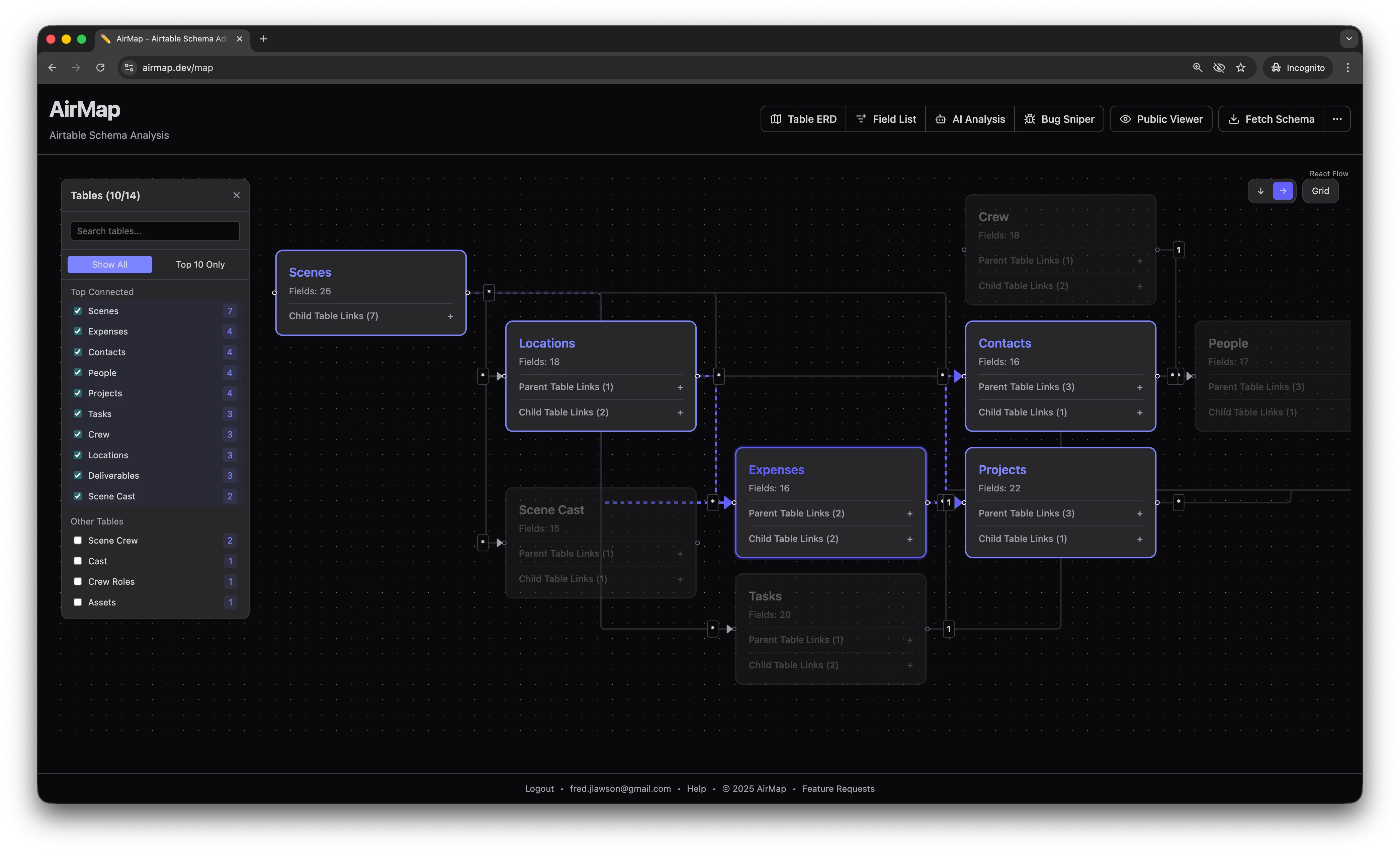
I have built a tool called AirMap to make it easier to work with and visualise complex schema from an Airtable base. It dynamically generates an ERD from the base you specify, and also allows you to pass in your schema into Google Gemini for analysis. I’d love any feedback on the tool — if it’s addressing a problem you face, or anything else you’d like to see in it. You can use the tool immediately with the preloaded demo credentials, or if you want to try it on your own schema, use the code airtable-community for a trial month.
 

6 replies

Mike_AutomaticN
Forum|alt.badge.img+28

Hey ​@Freddie_Lawson,


Thanks for sharing! I’d love if we could:

  1. Include Headers, text, sticky notes or similar.
  2. Have múltiple versions of the schema.


What I mean: when building documentation I cannot rely on Airtable’s base schema extension as I need to include text for describing the schema, and also I only get one version of the schema. So if I want to show first one aspect of the system (eg. Relation between Contacts and interactions), and in a separate page or section of the can as a different aspect (eg. Products and orders), even if everything corresponds to the same base, I cannot do that. 
 

Hope this helps!

Mike


Freddie_Lawson
Forum|alt.badge.img+2
  • Author
  • New Participant
  • November 14, 2025

Thanks for the feedback ​@Mike_AutomaticN ! 

Was it clear to you that can you deselect tables like the below, to show only a subset of your schema? If I added a simple PNG export CTA (with file naming) would that be helpful to your need re; annotation?


Mike_AutomaticN
Forum|alt.badge.img+28

Hey ​@Freddie_Lawson!

I did notice that I could hide tables. And yes! PNG download would be good enough! 
 

Mike


Forum|alt.badge.img+3
  • Participating Frequently
  • November 17, 2025

Nice setup, it can be really frustrating when trying to visualize where all of the connections and dependencies are within Airtable.  This can really help know where everything is going and give better visuals at where connections between data belong.


Mike_AutomaticN
Forum|alt.badge.img+28

Hey ​@Freddie_Lawson,

I see I can see how many fields each table has.. but is it possible to actually show the fields on the canvas? And ideally only show/hide certain fields? (note that this is different to the field list tab)


Completely different matter, but would love to have you join our Airtable Hackathon! Make sure to sign up!!

Mike, Consultant @ Automatic Nation 
YouTube Channel


Freddie_Lawson
Forum|alt.badge.img+2
  • Author
  • New Participant
  • December 2, 2025

@Mike_AutomaticN yes -- I’d been meaning to add that -- will do so!

