
Using Filters to auto-fill fields with data

  • Jun 30, 2017 7:45 PM UTC
  • 5 replies
  • 127 views

Hi! So I recently noticed that if I am creating records in a filtered view that all NEW records added in that view will automatically get the same values that are required by that filter.
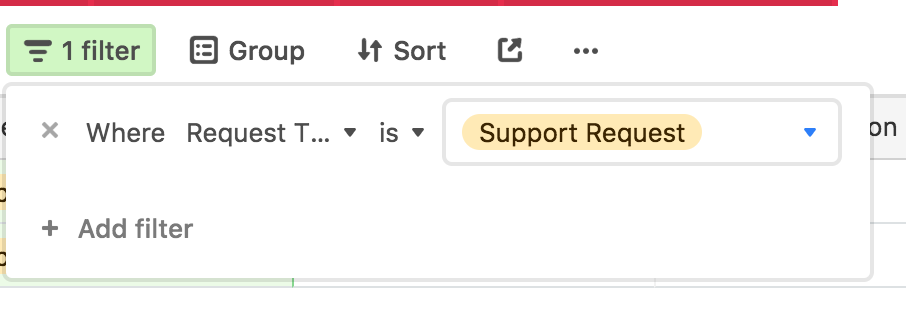
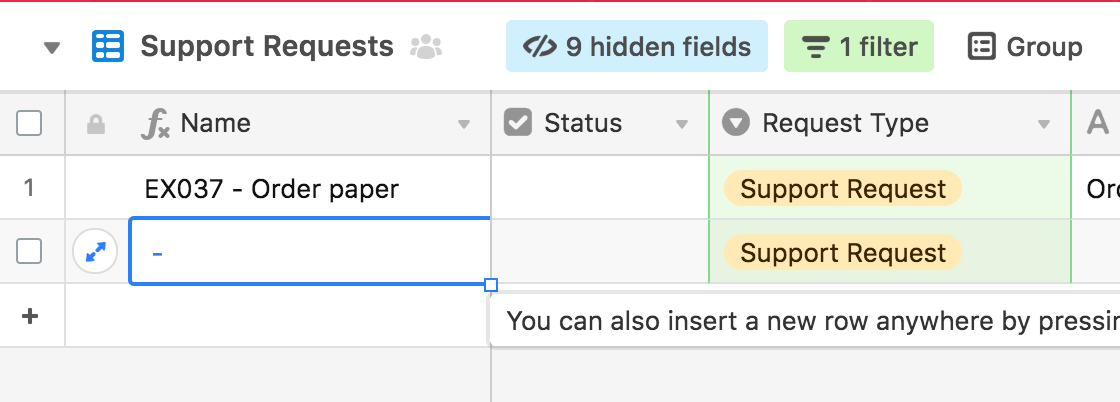
This is pretty AWESOME! Ive been itching to get new records to auto-fill and this helps me get toward that goal.

Feature request… If you could attach a form view to create records in a specific view, that would ROCK! However, I do also use the ‘prefill’ in the URL option to do that.

This topic has been closed for replies.

5 replies

  • Participating Frequently
  • Jul 12, 2017 9:57 PM UTC

It also works when you group records!


Forum|alt.badge.img+1
  • New Participant
  • Nov 8, 2018 10:30 AM UTC

Thanks for this suggestion. Unfortunately, it does not work for Linked Fields


  • New Participant
  • Feb 20, 2019 12:30 AM UTC

Any word on when this will work with linked fields? We currently have a workflow that depends on filtering records with linked fields, and resorted to creating a dummy variable column that’s a 1:1 copy to autopopulate records so they don’t get filtered out


  • New Participant
  • Aug 21, 2019 6:21 PM UTC

Hello! I’m having an issue with a certain field autofilling to a view. We have older (read: “less tech savvy”) employees, and I have the views filtered by their name in a hidden field for “Assigned To.” But, if she’s filling a row and only gets one or two cells in and accidentally clicks somewhere else, the row she was working on is not autofilled to her view, and therefore filtered out so she starts again. So there are duplicates of tasks where she wasn’t able to complete the row before it was filtered out. Any suggestions?


Forum|alt.badge.img+15
  • Inspiring
  • Jun 18, 2021 6:31 PM UTC

We recently launched a new feature that allows you to prefill ‘filters’. It forces linked fields to only show limited records on the form.