Question

Sending calendar invites .ics

  • February 3, 2026
  • 6 replies
  • 37 views

Forum|alt.badge.img+1

We are looking for Airtable to help automate our Onboarding process.  It seems like it sends a blank email whereas we want a calendar invite they can click accept and it be inserted into their calendar.  Then we also tried Google meetings to get this working but it only works with 1 user.  Once you add more than 1 person it will not send a calendar invite.  Any advice would be appreciated.

6 replies

TheTimeSavingCo
Forum|alt.badge.img+31

Hmm may I know how you’re sending these out?  

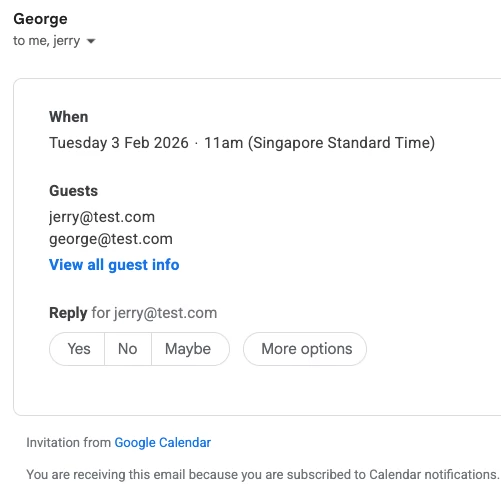
If it helps, I just tried using the ‘Google Calendar: Create Event’ action and added two attendees and received emails in both inboxes fine

And here are the emails where the users can click to accept:


Forum|alt.badge.img
  • New Participant
  • February 3, 2026

We have it pulling from multiple data columns vs a typed out name do you think that could be why?


TheTimeSavingCo
Forum|alt.badge.img+31

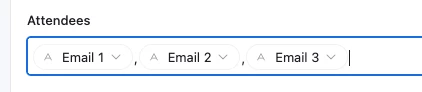
Hmm, yeah it could be if the formatting is off.  We just need to make sure we’ve got comma seperated emails in the ‘Attendees’ list, e.g.

It’s pretty forgiving of extra commas and would take something like this fine too, so we wouldn’t need to worry too much about extra commas

jerry@test.com,, george@test.com

Could you provide some screenshots of your data and the automation set up?  Specifically, a row of data where you’re trying to send the invite to multiple people and where it didn’t work?


Forum|alt.badge.img
  • New Participant
  • February 3, 2026

The commas did it! i had one semi colon hiding. 

Thank you so much for your help! 


Forum|alt.badge.img+1
  • Author
  • New Participant
  • February 3, 2026

Is there a way to send the calendar invites through M365 or do we have to use a Gmail account?


DisraeliGears01
Forum|alt.badge.img+21

Is there a way to send the calendar invites through M365 or do we have to use a Gmail account?

Just use the Outlook integration instead of GCal. I have a setup that autogenerates and invites folks to events using Outlook. Just FYI whatever account you integrate with the automation, the invites will look like it’s coming from them. It threw off a couple of our interpreters for a moment, they were asking why I was inviting them to these events haha. Oh and it’s made a mess of my Sent Items folder in Outlook. 

And while these are not exactly .ics files (since they’re GCal or Outlook events) if you do want to generate and send .ics files, I wrote up a walkthrough a while back here. This is useful if you want to send calendar agnostic invites (sometimes GCal invites don’t play nice with Outlook or whatever) or invites that aren’t shared (so events where people might want to have it on their calendar as a reminder, but don’t need to be subscribed to a single event that tracks changes and everything).