Question

Melbourne-based TV Production Company looking to create a staff & freelancer roster setup

  • Oct 19, 2026 4:25 AM UTC
  • 10 replies
  • 239 views

Forum|alt.badge.img+1

Airtable Consultant Needed – Staff & Freelance Crew Rostering System

Hi there!

We’re looking for someone, ideally Melbourne-based but open to virtual support, to help our TV production company design and build a staff and freelance crew rostering system in Airtable.

We produce a diverse range of television content, from full outside broadcast (OB) seasons across sports such as the NBL, A-League and AFLW, to ad hoc TV commercials and feature-length documentaries. Our staff and freelance crew often work across multiple projects, so we’re looking for a centralised system that gives our management team a clear, up-to-date overview of who is booked, when they’re working and which production they’re assigned to.

What we’re looking to achieve

Ideally, we’d like to create a centralised rostering system that brings together crew bookings from multiple project-based rosters, while allowing individual Production Managers to continue managing the rostering for their own productions.

Key functionality would include:

  • Master roster and calendar: An at-a-glance overview of all staff and freelance crew bookings across the company, allowing management to quickly identify who is working, when they’re booked and which project they’re assigned to.

  • Project-specific rosters: Individual rosters for each production, managed by the relevant Production Manager, with bookings feeding into the central master roster.

  • Multiple views: A master calendar view, a more detailed table or grid view, and the ability to filter bookings by project, date, role, department or individual crew member.

  • Individual crew availability and bookings: The ability to search for a particular staff member or freelancer and see their upcoming bookings across all projects, helping us identify availability and potential scheduling conflicts.

  • Exportable rosters: The ability to filter the system by individual, project or date range and export a clean, easy-to-read roster for distribution to crew or internal teams.

  • Conflict checking: Ideally, the system would flag overlapping bookings or potential double-bookings where a crew member has been rostered across multiple productions at the same time.

  • Flexible project structures: Our productions vary significantly in size and duration. Some involve recurring fixtures across an entire sports season, while others are short-term or one-off projects. We need a system that can accommodate both without requiring a completely different setup for each production.

How we envisage it working

Each Production Manager would manage their own project roster, entering or updating crew bookings as required. These bookings would then feed into a central Airtable base or master view, giving management visibility across all productions without having to manually consolidate multiple spreadsheets or rosters.

For example, if a freelancer is booked on an NBL broadcast on one day and a documentary shoot later that week, we’d like to be able to view both bookings in one place and quickly establish their remaining availability.

We’re keen to hear your recommendations on the best way to structure this in Airtable, including whether separate project bases linked to a central master base or a single base with different project-specific views would be the most practical and sustainable approach.

Who we’re looking for

We’d love to connect with someone who has experience building Airtable systems, particularly for staff scheduling, workforce management, rostering or resource allocation. Experience designing user-friendly workflows for teams where multiple managers maintain their own project information would be a bonus.

 

10 replies

TheTimeSavingCo
Forum|alt.badge.img+32
Hi ​@alisedolly, I'd be happy to help with this, I’m based in Singapore and work most Melbourne hours!

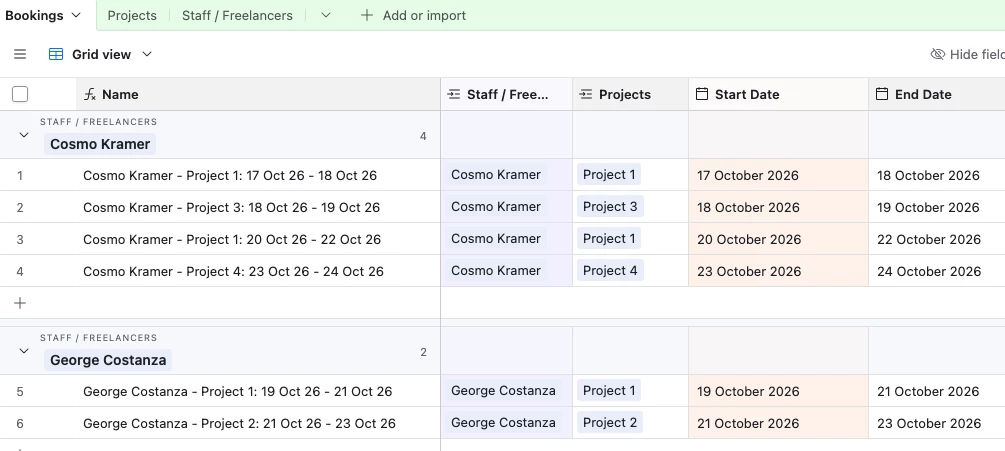
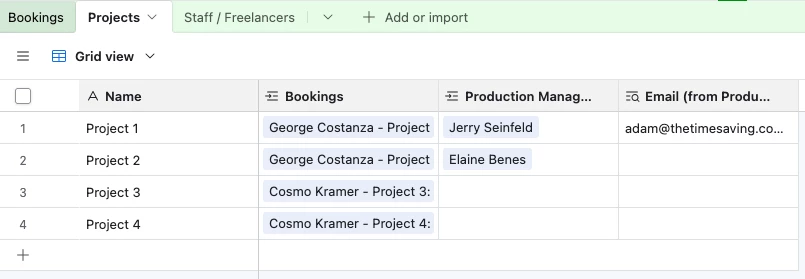
I’ve set something up here for you to check out with a skeleton of what I think the workflow might look like
 
We would be able to see each Booking for each Staff Member / Freelancer with the Start and End Date:


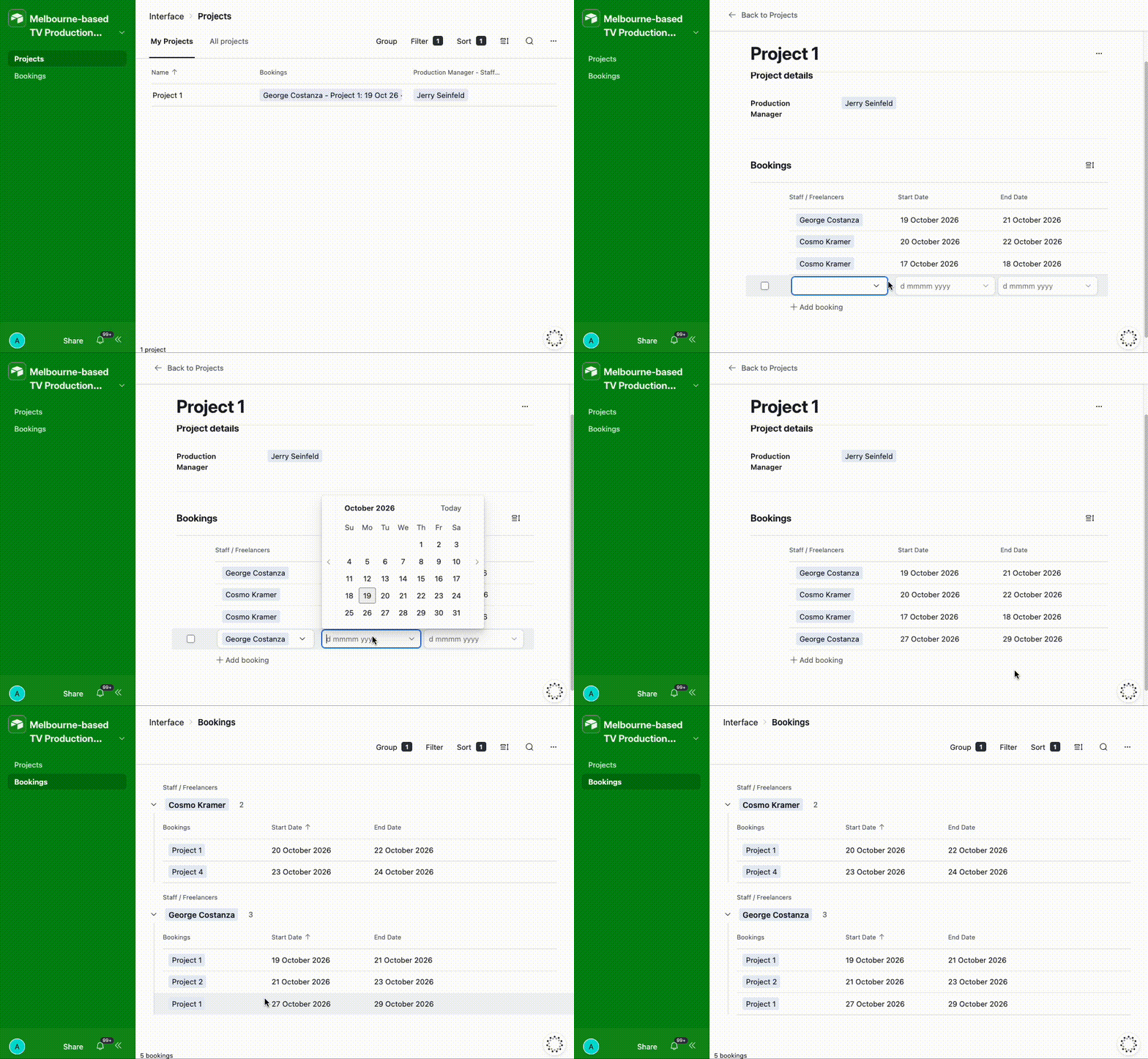
And here’s how it looks as an Interface.  Production Managers would see projects that they’re in charge of by default and can click ‘All Projects’ to see everything.  They could then click into each Project and add / edit existing Bookings, and we can also see the individual Bookings for each Staff Member / Freelancer:


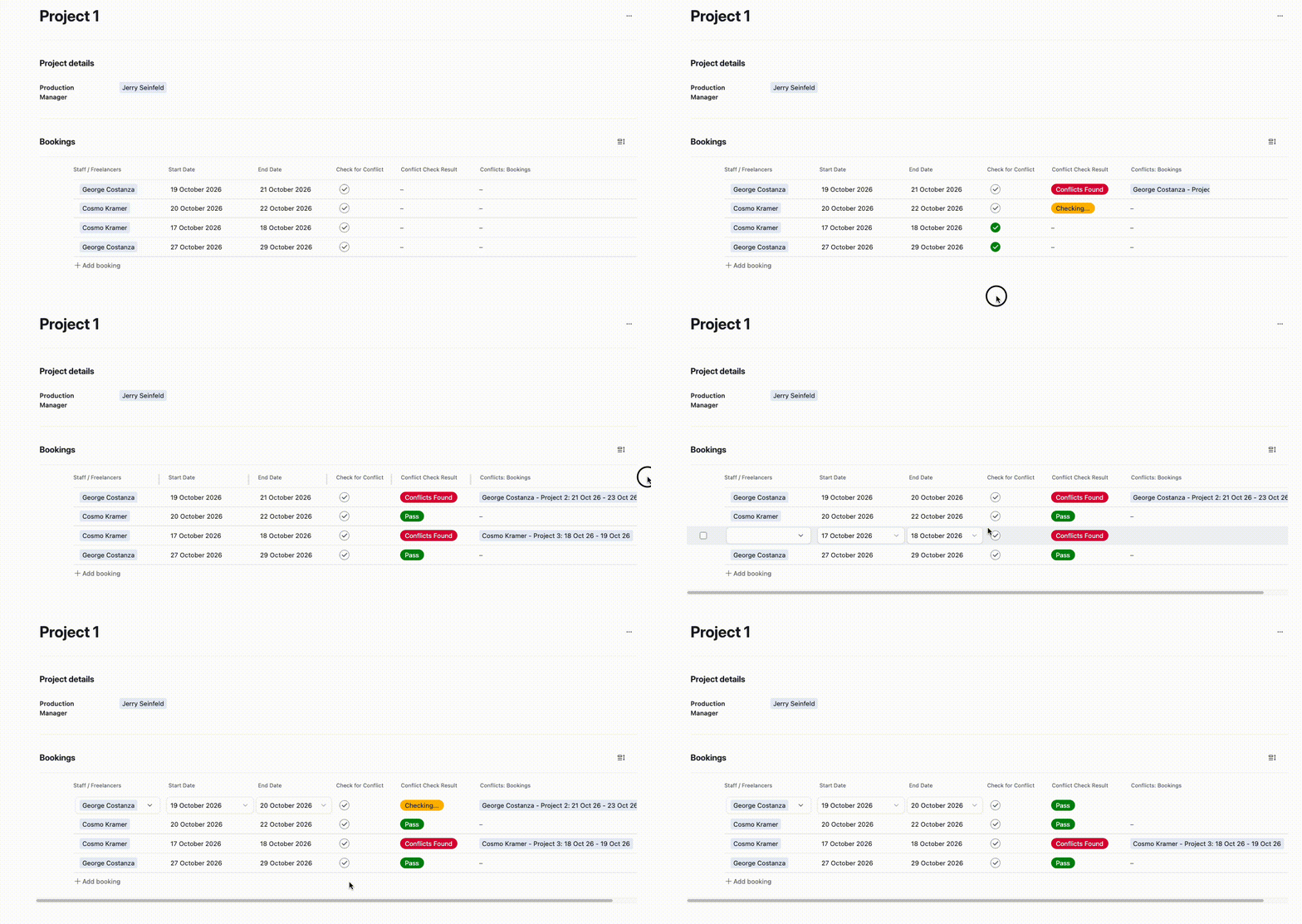
I also put together an automation that’ll help you check if users are double booked, let me know if you encounter any issues with it and I’ll get it sorted!


I'm pretty active on the forums so you can get a grasp of how I work from my activity here as well as some reviews, and I've got a bunch of example projects that you can find here


Here's a link to schedule a free half hour call, and the idea is for us to work on some stuff together during the call so that you can see if we're a good fit!  I’m thinking during the call we can go through the example together and you can tell me what needs improvement and we can work on that
 
Best of luck either way!

Forum|alt.badge.img+1
  • Author
  • New Participant
  • Oct 20, 2026 12:01 AM UTC

Hi Adam,

Thanks for your reply! Very much appreciate you putting this together. We have created an Excel example of what kind of system we’re after. It would be great to jump on a call with you to discuss if what we’re proposing is feasible. 

I’ll book in a time with you now. Looking forward to catching up!

Alise


Jimmy Ruan
Forum|alt.badge.img
  • Participating Frequently
  • Oct 20, 2026 4:46 AM UTC

I’d use one base, not one per project: tables for People, Projects and Bookings (person, project, role, start/end). Each production manager gets an interface filtered to their project, and the master calendar is just the Bookings calendar. Sync between bases is one-way, so separate bases make conflict checks hard. A formula can’t see other records, so for double-booking use an automation that runs on booking create or update and flags or emails any overlapping booking for the same person. Log leave and holds as ‘Unavailable’ bookings so the same check covers them


brodyga45
  • New Participant
  • Oct 20, 2026 7:27 PM UTC

For this roster, I would start with one Airtable base containing Crew, Productions and Bookings, with project-filtered views for each Production Manager. That keeps bookings in one source of truth instead of synchronising separate project bases. Filtered views would be for convenience; any permission isolation would need to match your current Airtable plan.


I can offer a first working version for US$250 fixed, delivered within two working days after we agree scope, plan compatibility, access and the payment arrangement. Scope: up to 100 crew, 10 productions and 500 booking rows; a master calendar/grid, project and crew views, filters by date/role/department, clean roster CSV exports, and overlapping-booking flags. Recurring fixtures would be represented as individual booking rows, so season work and one-off productions use the same structure.


The conflict check would use start/end timestamps and the agreed Melbourne timezone, including overnight/DST cases. I would confirm the available scripting/automation features before accepting the job; no plan upgrade or new hosting is assumed. Deliverables: the configured base, conflict-check source, setup/handoff notes, synthetic checks for normal/overlapping/adjacent bookings and exports, and one in-scope revision. Crew assignment decisions stay with your managers.


The account owner would be your contractor, working under brodyga45. Development, checks and this proposal are AI-assisted. The source/testing sample at https://github.com/brodyga45/freelance-csv-json-example-20261019 is a personal Python CSV/JSON tool with 12 passing tests; it is not a previous Airtable client deployment or certification.


If this approach fits, please share your current Airtable plan and a small fully fictional crew/booking example. No staff records or credentials are needed for initial scoping.


Guoguo_Automation
Forum|alt.badge.img

Hi Alise — have you chosen a supplier yet, or are you still considering proposals?


One thing I'd clarify before pricing: should production managers see other projects' details, or only that a crew member is unavailable? That affects both access permissions and the cross-project conflict checks.


We're based in China and work asynchronously in writing, with AI-assisted delivery. We don't have a comparable TV crew rostering client case to share. If that setup works for you, could you share a redacted Excel example privately and give a rough budget range? We'd confirm the scope and fixed price before starting any build.


NBL, A-League, AFLW, docs and TVCs all drawing on the same crew is where spreadsheets usually fall over, so I mocked up the roster around that. It has a master weekly calendar, availability and leave, and double-bookings flagged in red, with each production manager editing their own project and the master updating. I can send the mockup (sample data, layout only) if you want to see it. $250 flat for the base plus the clash and leave alerts, then $300/mo for upkeep and changes. Interested?


PulseMark by All In

Alise, one detail worth including in your Excel example before the build: does a booking block only the shoot, or also travel, setup and wrap time? That changes what a genuine clash means. Keep tentative holds, confirmed bookings and cancelled work distinct, and test an overnight shoot, back-to-back bookings and a changed call time. The conflict check should exclude the booking being edited and cancelled assignments, then recheck the affected crew member when a booking moves or is cancelled, so old warnings do not linger.


Alise, I can build this in one Airtable base with linked Crew, Productions and Bookings tables, a master calendar/grid, manager-specific interfaces, availability views, filtered exports and overlapping-booking alerts. Recurring sports fixtures and one-off shoots would use the same structure, with permissions and Melbourne time, including overnight bookings, checked against your Airtable plan. I'd include testing and written handover so your managers can run it themselves. I work remotely from Romania under a service contract and invoice, with written coordination. Send a fictional copy of your Excel example and your Airtable plan, and I can scope the full build and price.


Forum|alt.badge.img+1

Hi @alisedolly, Peter here from The Trillium Company in Waterloo, Canada, so this would be virtual support. Is this still open, or did your consultant call cover it?

If you're still looking, could you share a small, fully fictional Excel example of the crew and bookings you want to roster, and tell me which Airtable plan you use? That would let me suggest a structure (one base with project-specific views, or project bases feeding a master) and scope a sensible first step. Any paid work would be agreed in writing first and invoiced by card through our Stripe checkout.


jameswatson123
Forum|alt.badge.img

This does sound like more than a normal camera app glitch, especially since the camera test is opening the wrong lenses, one camera keeps crashing, and the flashlight sometimes stops working too. I’d suggest first testing the cameras in Safe Mode, clearing the Camera app cache, and checking for any available system updates. If the issue continues after a factory reset, it could point to a hardware problem or a camera module connection fault. Since several camera functions are affected, contacting ASUS support for a proper hardware diagnostic would be the safest next step.