The show and tell space is a place to showcase your work and have conversations about what you’ve been creating in Airtable.
Recently active
Hi everyone!Around two weeks ago I released an Airtable extension that helps you save emails to Airtable. A lot of you were so kind to have tried it out and gave me many valuable feedback, thank you!I started working on snippets and blocks that can be set up in your Airtable base to log emails and act as an CRM like Salesforce does. I wrote an article here to show you some cool features and views you could create with Airtable and emails to use your base as a CRM.I am also in the process of creating a generalised Airtable CRM template and will make it available for free so more people can get started using Airtable as a CRM quickly. I thought that CRM systems are best customised to be most useful, but if you are interested in helping me by giving me some feedback, leave a response here.
When I open the calendar workspace on mobile (android) and on days that I have an appointment and a blue dot it does not show the record. I have a message that says "this date has no record" if I click Done and re-open it the appointments are there. This is really frustrating - and happens EVERY SINGLE time on every day.Please help!
Okay I believe I have finally solved this problem. Using a bunch of nested formulas and heaps of hints from these forums I managed to take the start date(/time) of an event in my table, and calculate the correct payroll date. If you've ever tried this before you may have come across several complications which generally come back to Airtable performing all calculations on a date field without considering the timezone that the displayed date field is in - it sometimes assumes date fields need to be translated back into GMT, and at others it just assumes they are already in GMT when they aren't... etc. Formulas like WEEKNUM() and SET_TIMEZONE() don't seem to work well together... etc.Anyway, I have tested this formula with a bunch of tricky dates around the start/end of a year and the start/end of a pay period and haven't come across any errors in the calculations yet. So my fingers are crossed that this formula is the solution that works for you too. Or, you know, someone better t
This code is used in a “Duration” formula field in an Activity tracking database. The formula calculates the hours and minutes of a duration of time (for an activity), and maintains a two digit display for minutes (H:MM) when the minutes portion of a duration is between 1 & 9 minutes. Without this code, a duration with a value for minutes between 1 & 9, for example a duration of 1 hour and 3 minutes, would display incorrectly as “1:3”, instead of correctly as “1:03”. THE FIELDS IN THE CODE OF THE FORMULA ARE: Date & Time: A date field. The user enters the starting date and time of an activity. End Time: A date field. The user enters the ending date and time of an activity. Duration: The formula field. The the code of the formula will calculate the duration of the activity. The duration will be displayed in the format H:MM. If the duration is less than an hour, the H will display a zero. If the minutes are less than 10 (but greater than zero), the minutes ten’s place will d
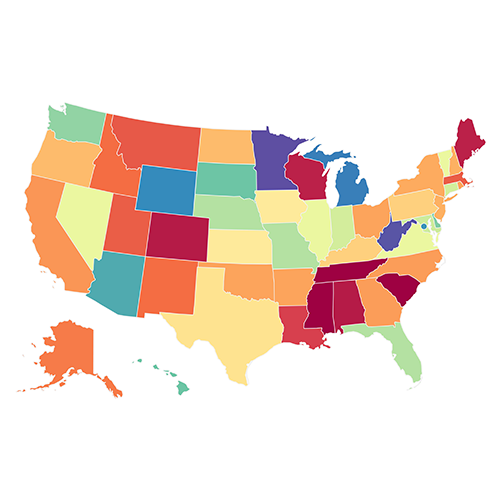
Hey everyone!My name is Minas and I run a map-making website, where you click on a map, add your legend, and download it as an image.A few months ago, one of my users, who is also using Airtable every day, suggested creating an Airtable extension with similar functionality:So, I am excited to announce that MapChart for Airtable is now available on the Marketplace: https://airtable.com/marketplace/blkmypAlv8OyL9Wd3/mapchart With MapChart, you can: 🗺️️ Create your own custom map from your base's data.📜 Display it next to your Airtable or download it as an image.📊 Use a variety of field types as the source of your map. Save time and use the MapChart extension to:💰 Track sales statistics by state.🌎 Visualize your company's worldwide presence.🗳️ Show election results by county.✈️ Make your own visited countries world map.🏢 Display your organization's activities across a re
This may be a little tricky to describe, and I'm a little excited after discovering this feature, so I'll do my best! My post is about the Interface Record Picker element, but the Airtable Help doesn't discuss this functionality.Today, whilst I was creating a new Time/Task tracker to keep a tabs on my time, along with what tasks and projects that I'm working on - I've always had the complaint that as each of my tables links in deeper to one another, when viewing via an Interface it becomes a bit of a click-scroll-click-scroll to get to the data that I'm needing to update, then a click-back-click-back to get back to my main interface - repeat ad nauseum - and I start to wonder if Interfaces are really worth investing the time in building, knowing that data is obfuscated by several clicks and it's really just easier to edit directly within the base... or so I thought.As I was finishing up today's efforts on my new personal use interface (and again, frustrated by the way users need t
TLDR: keeping track of automations that live outside airtable is hard. I made a chrome extension that tells you what Make scenarios are connected to the base you are in.Hey all- I’ve been doing consulting work on airtable since I left back in October. One of the biggest pains making that transition was in working with automation tools like zap and make and understanding what bases they were connected to and documentation of what happens to hand off to customers.I developed www.baseinspector.com to address this issue through a chrome extension. For now it’s quite simple but plan to extend it to documentation, field flagging etcWould love anyone that’s Interested to try the beta when in launched at the end of the month and would be super grateful for feedback thoughts etcyou can watch a video and sign up for the beta at www.baseinspector.com
When trying to concatenate fields together, we always face the problem of either having too many commas (if some fields are blank), or not enough commas (if we are trying to concatenate a lookup field). Not to mention the fact that some values show up as "Banana, Orange" while others show up as "Banana,Orange" without the space after the comma!To solve this problem, I have created a script extension that will help you to generate a formula that will concatenate all your selected fields!Once you have selected the table that contains the fields you want concatenated, you will be asked to select the fields you want concatenated. After you have selected all the fields you want, you can click "Selection Complete" and the formula will be generated for you. You can then copy and paste the formula into a formula field!The example base from the video above can be found at this link.To use this, add the "Script Extension" extension to your base, and paste in the code below:&nbs
Hi Friends of Airtable! I'm experimenting with a new free format, in which I live solve your Airtable challenges on my Youtube channel. You can submit your challenge and email via the following link and I'll record the first episode very soon: Submit your challenge here
This script was written to be used with the “Event planning” Airtable template, and can be adapted to any similarly structured base where the requirement to detect overlapping start and end times is pressing. When scheduling large Programs with many individual events at different locations, and across multiple days, it can be difficult to keep tabs on whether or not people have been double booked, and scheduling conflicts can cause chaos. This script is designed to help with that problem. It will check all events in the “Schedule” table for instances where an individual Speaker from the “Speaker & attendees” table has been scheduled to be in two places at the same time! For each speaker that has conflicting events scheduled, a table will be displayed under their name with a list of any offending events, so that they can be found and rescheduled. Any table, view, and field names that can vary from one base to another are stored in a constant at the beginning of the script – change
I have been working on an extension called TaskRobin to send emails into Airtable. After almost 3 months of reviews with the Airtable marketplace team, my extension is finally published on the marketplace!You can now easily create a table with all columns needed to store emails in Airtable with one click, and start saving emails to Airtable. This allows you to make Airtable a hub for customer support requests and CRM. Let me know what you think?More info about TaskRobin
Hi there I was hoping to gather some feedback from the community regarding an integration we are looking at launching. We are exploring integrating our software with Airtable so that people who require more complex, offline data capture (digital forms with logic) can capture information which then automatically synchs up with Airtable when connectivity returns. More here on our solution for context: https://vimeo.com/422707172 In summary Formworks allows users to create complex forms (which work offline) link to remote databases and also can apply logic to inputs when information is typed in by a user (calculations, acceptance ranges, workflows, hide and reveal, mandatory fields etc). In short it’s a very effective way of controlling data quality at the front end. My questions is whether an integration between Airtable and Formworks would be of interest to Airtable users? Is offline data capture a requirement for many users? Your feedback would be very much appreciated. Thanks
hi everyone. Is anyone have tried to use chatbot to retrieve a specific record in airtable based on condition?my use case is to check current points using ID number. Chatbot will ask the ID Number and chatbot will check in Airtable to find that specific ID and return its current points.Not sure if i can do it just using API or I need a third party platform to do this.Thanks!
I created .NET Client for Airtable.The client record download only.GitHub https://github.com/reniris/AirtableDownloadNuget https://www.nuget.org/packages/AirtableDownload/feedback or pull requests are welcome.
... it's because I'm walking away.I have honestly and with open-mindedness tried to use the new "community" in a productive and supportive manner, but it's just not working for me. There's something about this new Khoros platform that makes it difficult to engage and produce responses at a quick pace with smartly formatted information.The hallmark of a great community is pervasive and free-flowing conversation, but to have that, it needs to eliminate composition friction. This is not the case in the new and improved Airtable community. Rapidly responding to questions requires a lot of effort. Pasting images used to be a breeze. Rapidly composing with your silent but powerful Markdown friend was a pleasure.Composition simplicity is achieved through a minimalistic design. Khoros tries to be cool and hip at the expense of function and flow. Discourse has studied the art of simplistic content composition. Why Airtable rejected it, is a mystery.
In our Facebook group, we provide a list of restaurants that close in the off-season along with their locations and closing dates. We're in the process of updating the list with the restaurants' re-opening dates. We used to go through the onerous task of adding a graphic using Google sites so that when we posted the link in a comment, it looked like the graphic instead of this:Is there a better way to EASILY add a graphic or at least change the text to remove this generic AirTable wording to say like Restaurant Reopening Dates?Thank you
This extension will help you find unused select dropdown data (from either single select or multiple select fields) and delete them!Base with extension installedTo use it, install the "Script Extension" and paste the code below into it, and a video of how to do that is below Code:let settings = input.config({ title: `Identify and remove select field options that are not in use`, items: [ input.config.table("table", { label: `Table` }), input.config.field("field", { parentTable: `table`, label: `Field` }), ], }); let { table, field } = settings; let fieldData = table.getField(field.id) let fieldType = fieldData.type if(fieldType != "singleSelect" && fieldType != "multipleSelects" ) throw("Only works with single select or multiple select fields") let query = await table.selectRecordsAsync({fields: [field]}) let inUse = new Object; for (let r of query.records){ let selectedOptions = r.getCellValue(field) if(selectedOptions){ if(f
Dear Community:I'm currently running a communitys survey with a giftcard drawing. I've noticed some suspicious responses come in (emails with formats NAMENAME #####), non-standard/nonsensical answers to fillable responses. Some are also in other languages, which is not a flag in and of itself since we are a multi-lingual community.One section is for busiensses and requires a business address - folks who don't give me one in the area geography (in town) are disqualified. I hadn't required this for general population as I don't want to discourage respondents, but since I can't use CAPTCHA I'm currently thinking my best solution is to require an address, state its necessary for data validation, and disclose that my org won't use or share this info?Any advice on best practices, ways to accurately clean my data, or other methods to ensure valid responses and not a flood of randos just wanting a gift card? Thanks!
I use Airtable for budgeting, because I'm that guy who finds a few little things that I don't like about every piece of software I use, and would rather be in control of how something as important as my budgeting system works... even if it means working within the constraints of something like Airtable :smirk:In any case, one of the things I was missing from good budgeting software, when I switched to using Airtable, was monthly tracking charts. But something that I like to do, and which isn't supported by many other budgeting softwares is annual tracking charts. For our family, tracking something like a "Clothing" budget doesn't really make sense to do on a monthly basis -- there are some months we don't buy any clothes, and some months when we buy ALL THE clothes. Using the monthly "sinking fund" style of budget for this made it difficult for me to determine how well we were doing at actually keeping to the budget. Much easier to do within the scope of an entire year.So, one of
Looking for even more Airtable communities where you can share your love & passion for Airtable?The Airtable experts at ScottWorld and BuiltOnAir have teamed up to bring you TableForums: The Airtable Discussion Community!TableForums is a place where you can learn from Airtable experts, connect with other Airtable enthusiasts, and get the support you need to make the most of Airtable.Come network with like-minded individuals, share tips & best practices, and get help with any questions you might have. Whether you’re new to Airtable or a seasoned pro, we’re excited to have you join the conversation. We’re always looking for new ideas and perspectives, so don’t be shy about joining in!We can’t wait to see what you have to contribute! 😃
A few days ago, I tried to help another Airtable enthusiast concerning a question about timelines. According to this community platform, I have written about 3250 posts since 2018, and despite my grandfatherly age, I recall one such post about Vega-Lite that would be perfect to help this customer.When a search engine believes you've made a mistake crafting your query, such as a misspelling, it tries to help. In this case, it demonstrates a significant degree of cluelessness.Did you mean: negative-lite ... Seriously? And what will this brilliant discovery engine tell me about "negative-lite"? Feel free to dive into that rabbit hole. We need to press on with a point to this post.Looking through all 42 pages of results did not contain the post I was looking for, but it did give me a few laughs like this one. It's entirely irrelevant to the query.The Khoros search engine has no idea that Vega-Lite is an entity, much less an Airtable extension. This says a great deal about the indexin
After importing data, it’s not uncommon to want to clean up and normalize data values, especially text fields that may have all types of inconsistencies. Unfortunately, Airtable doesn’t support in-place transformations where formulas can be applied to modify the field contents of all cells. This is where the Field Tweaker script block can help. It supports in-place text transformations including upper case, lower case, and title case modifications across all records for select fields. The script is published below and this base provides a simple sales table to experiment with and also includes the script block. When you run Field Tweaker, you define a changeset which includes the table name and the field name you want to tweak, and lastly - the tweak you want to apply which in this example script block includes: Upper Case (LIKE THIS) Lower Case (like this) Title Case (Like This) In the following example, we have a field named PRODUCTLINE where values have been imported in lower case
A simple and minimalist base to help small businesses and teams track issues and squash bugs. Get the template now on https://www.airtable.com/universe/expJSAwygjVK9DfJ2/issue-tracker-project-managementSupport Server: dsc.gg/trackers - Get Help on Discord.Currently, the base has the followingGrid View - All Bugs - You can preview all of the issues that have been created.Board View - Kanban - Sorts all of the issues by the following categories (cards) which are: To-Do, In Progress, Code Review, Final QA, Passed QA, and DoneView by Priority - Showcases all of the issues based on priority which is: Low, Medium, and High.View by Status - Showcases all of the issues that have been DONE. The default fields that have been added are:Name of Issue.Priority.Description.Steps to reproduce.Screenshots & Videos.Assigned To.Status.The client is notified.Board View (Status).Date of Submission. The Issue Tracker also includes a table called "Team Members" to which y
I thought this might be useful for others, as I had to figure out how to do it for myself to automate sending emails during the right timezone for the recipient; here’s a list of all the timezones for US states: IF(OR({State}="CA", {State}="WA", {State}="OR", {State}="NV"), "PST", IF(OR({State}="MT", {State}="ID", {State}="WY", {State}="SD", {State}="UT", {State}="CO", {State}="AZ", {State}="NM"), "MST", IF(OR({State}="ND", {State}="MN", {State}="WI", {State}="IA", {State}="NE", {State}="IL", {State}="KS", {State}="MO", {State}="OK", {State}="AR", {State}="TN", {State}="TX", {State}="LA", {State}="MS", {State}="AL"), "CST", IF(OR({State}="MI", {State}="IN", {State}="OH", {State}="ME", {State}="VT", {State}="NY", {State}="NH", {State}="MA", {State}="CT", {State}="RI", {State}="PA", {State}="NJ", {State}="MD", {State}="DE", {State}="WV", {State}="KY", {State}="VA", {State}="NC", {State}="SC", {State}="GA", {State}="FL", {State}="DC"), "EST", IF({State}="AK", "AST", IF({State}="HI", "HST"
Hi,Hope you are all doing well.I need a little help. I have a simple single select column which have different tags and can be updated time to time. I want to calculate the edit history of each tag in other column and wanted to know how many days requiring each tag i.e when it was changed from in progress to shipped. I want to calculate the time and no. of days.I'd really thankful if anyone provide me best solution 🙂Thanky you
Already have an account? Login
No account yet? Create an account
Enter your E-mail address. We'll send you an e-mail with instructions to reset your password.