Get the latest Airtable news and updates.
Recently active
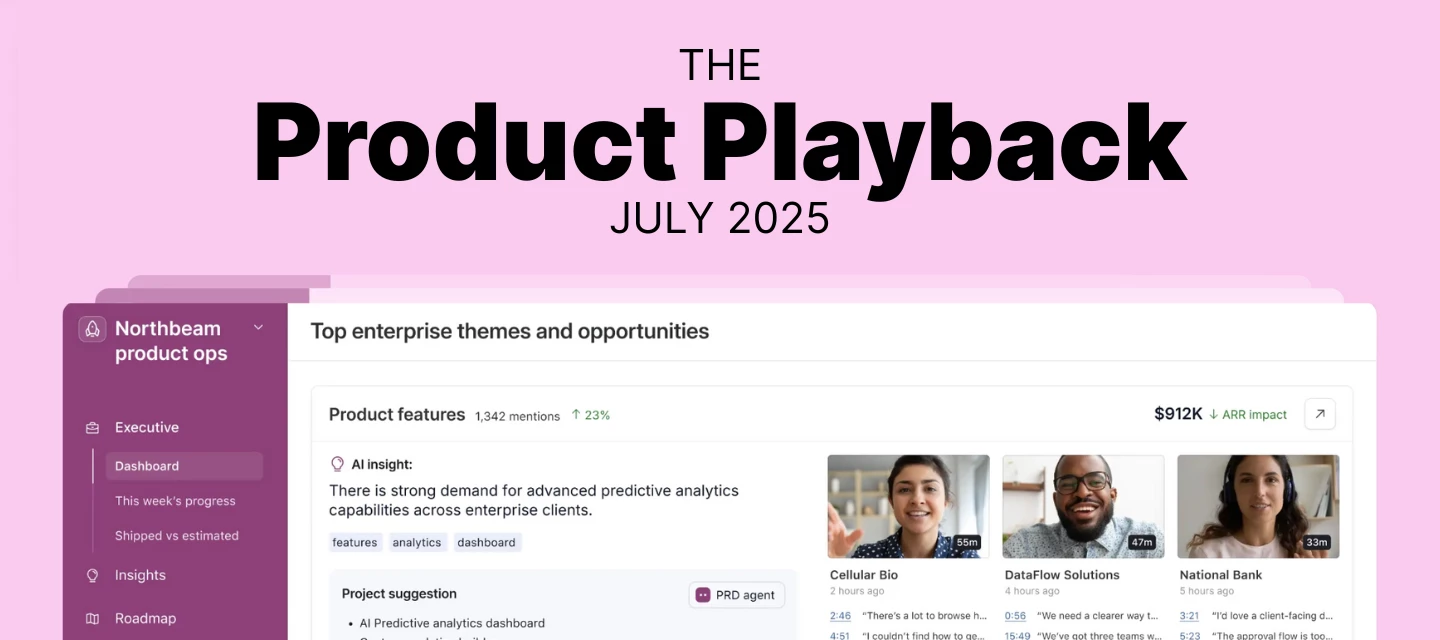
Hey Airtable Community!I'm Zach Felsenstein from the Product Ops team at Airtable. Welcome to our quarterly Product Playback – a snapshot of what we're hearing from you and how we're responding.Thank you for continuing to share your ideas and feedback. Over the past three months (July-September), you've submitted 500+ pieces of feedback through our Product Ideas form. We read every submission, and your detailed feedback directly influences our roadmap priorities. The themes you're seeing reflected here represent the consolidation of hundreds of individual requests.About this post: We cover the most requested features, what we've shipped, what's in progress, and what we're considering. Our roadmap evolves based on customer needs, technical factors, and market dynamics, so while plans may shift, we want to keep you informed about our direction.Ready? Let's dive into what you've been asking for and what we're building. 🚀 New AI Capabilities AI-Generated Interface Elements (AI Labs)Omni
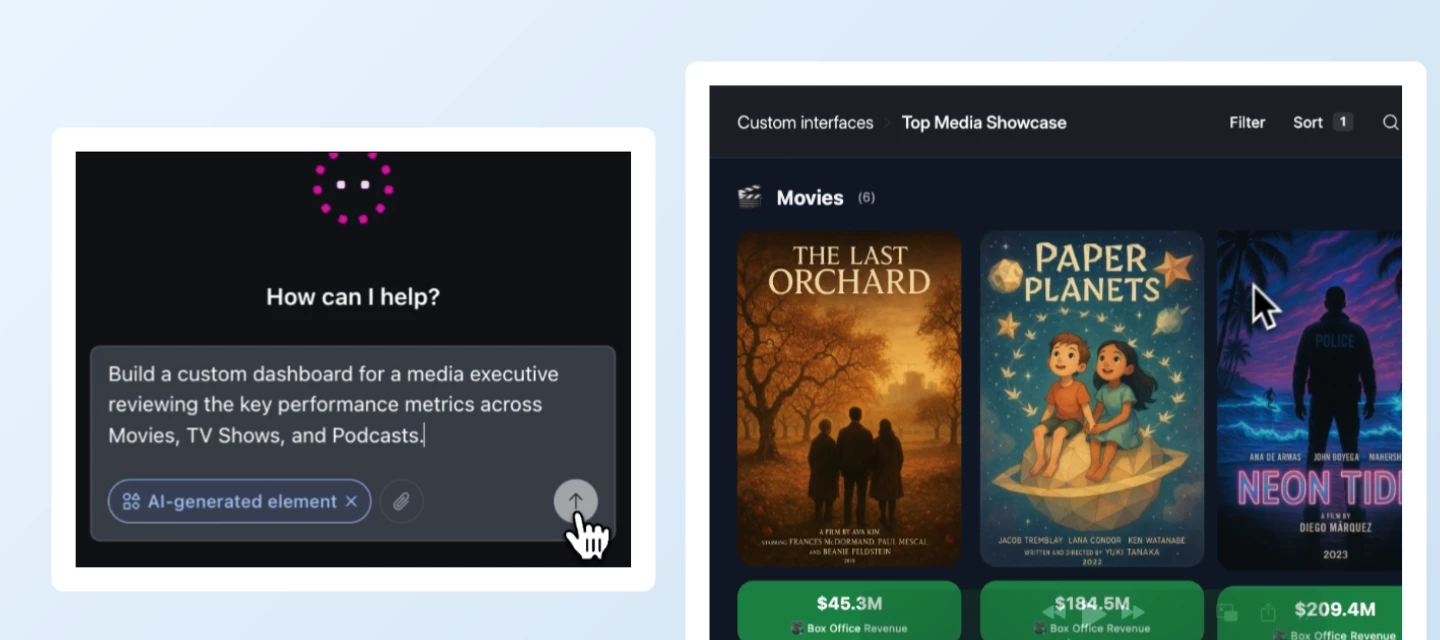
Building on the recent launch of AI-generated interface elements, we’re excited to announce that custom interface elements can now pull in data from multiple tables. This was the community’s #1 request since launch! This capability applies to custom elements created via Omni (AI Labs) or created through the SDK (open beta for Teams, Business and Enterprise Scale plans.) We’re also releasing two other highly requested upgrades: Version history for custom elements in Interface Designer: revert to using an older version of a custom element in an Interface page, which is particularly useful when Omni struggles to fix problems and you need to return to a known good state Revert and undo custom element changes in Omni chat: you can now revert to an older version of a custom element by clicking on a new “Revert” action next to any Omni message that made changes to the custom element, as well as undo’ing the last change by just asking Omni “Undo that” or similar What are some examples of what
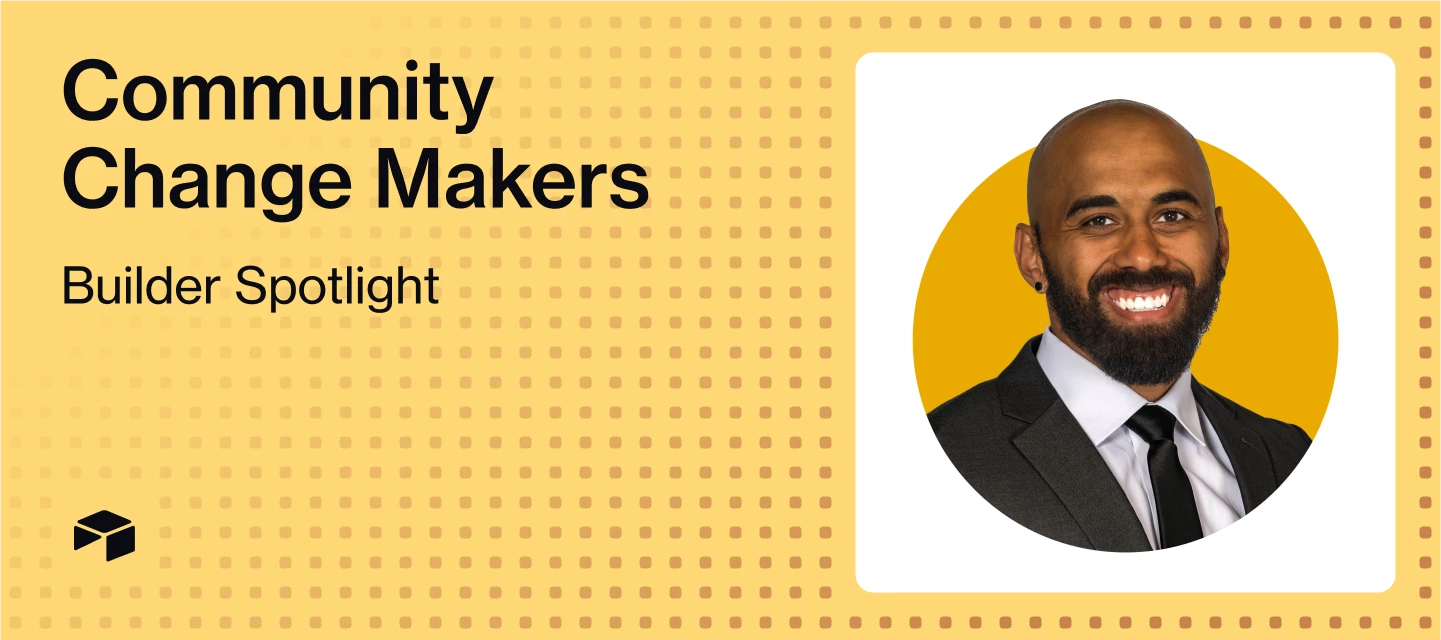
Welcome to Change Makers, our series highlighting customer stories and builders making an incredible impact with Airtable. Today’s Change Maker co-leads the Airtable EDUser Group, a space for any and all Airtable users in education.For anyone who’s ever hit the limits of a spreadsheet, discovering Airtable can feel like unlocking a new level in workflow design. Our Airtable EDUser Group’s co-leader Gaston Viau (@gaston) was a Google Sheets enthusiast before discovering Airtable in 2021, but, since then, has never looked back. Now, as the co-founder and CEO of Boltflow, he’s on a mission to help others unlock the full potential of this powerful platform. Meet Gaston, Co-Founder & CEO of Boltflow 📖 If you weren’t in your current role, what would you be doing?Probably designing houses. Construction has always been a passion — and honestly, building in Airtable feels oddly similar. You start with a solid foundation (your data layer), then layer structure and creativity until somethi
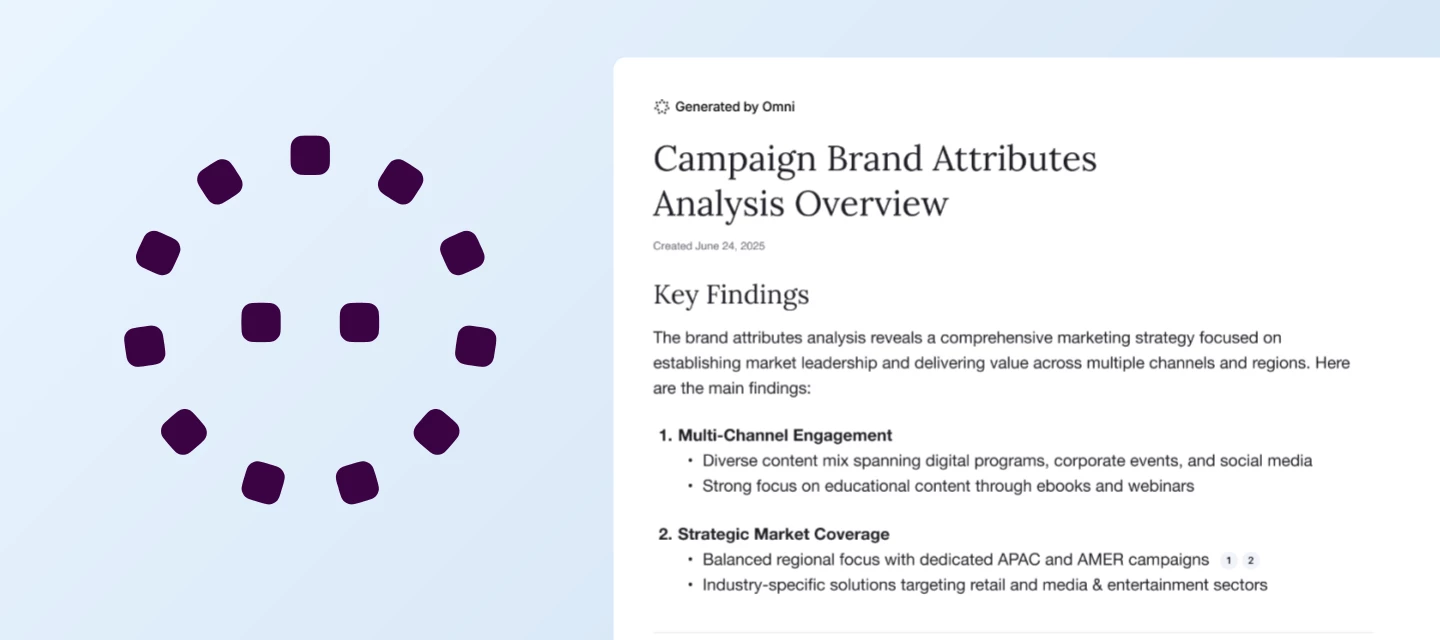
We’re excited to announce the launch of Omni Reports to AI Labs — a powerful new way to turn your Airtable data into actionable insights and beautifully formatted reports, all in just a few clicks. With Omni Reports, you can:Track campaign performance and content pipelines with automated marketing summaries. Get a clear view of what’s working, spot trends, and share results with your team—no manual number crunching required. Monitor product progress and team alignment with daily or weekly project updates. Keep everyone on the same page with up-to-date snapshots of milestones, blockers, and next steps, generated directly from your project data. Analyze sales pipelines and customer feedback to drive smarter, data-driven decisions. Surface key metrics, identify opportunities, and understand customer sentiment—all without building complex dashboards. How it works:Omni Reports uses AI to analyze your Airtable bases and automatically generate tailored reports based on your data. Just select
Welcome to Change Makers, our series highlighting customer stories and builders making an incredible impact with Airtable. Today’s Change Maker is a co-leader of the Airtable EDUser Group! Meet Blessing, Director of Data Operations and Administration at Teachers College, Columbia University 📖 If you weren’t in your current role, what would you be doing?I’d probably be living somewhere remote—not too remote, because I need WiFi and easy access to boba—but remote enough to be able to sit in front of a computer and write all day. Just cranking out pages upon pages of epic Elden Ring and Foundation-esque SFF novels and feature-length film scripts that feature rich, complex, galaxy-spanning worlds that feel uncanny—somehow both eerily familiar and bizarrely foreign.My dream? To write a Denis Villeneuve-directed, female-led, grounded sci-fi spy thriller that’s a gut-punch of emotions and smooth fight choreography—think The Bourne Identity meets Arrival.🦸🏻♀️ What’s your superpower at work
Hey Airtable Community,I’m a few days late, but can you believe that October is here? Time to break out the cozy sweaters, sip on pumpkin spice everything, and maybe start planning those Halloween costumes! Speaking of treats (not tricks), let's celebrate our September Top Contributors who deserve all the candy corn for being such phenomenal members of the community.Reminder: When recognizing our Top Contributors, we look at the quantitative data (e.g. likes received, answers given), as well as the quality to make sure everyone follows our Community Code of Conduct and Guidelines in their activity.In September, our Top Contributors provided 24 answers, 453 replies, and received 144 likes. And, at the top of the leaderboard, our top 5 earners cumulatively collected 3,283 points 🤯 Congrats to all and thank you for being an essential part of the Airtable Community! Top Solution Authors 🧠@Mike_AutomaticN, @TheTimeSavingCo, and @ScottWorld - 6 Answers Given @Alexey_Gusev - 3 Answers
Hi everyone, I’m Carla – a software engineer at Airtable and I am really happy to share that we’ve added the ability to dynamically filter results in linked record pickers! You can now limit the records that can be selected on a linked record field by configuring a filter based on the value from another field from the same record. For example, when assigning People to a Task, instead of browsing through the full table of People, you can now filter the linked records available for selection based on another field on the Tasks table, in this case we can use the value of the Skills Required field to filter the list of People to only those that have the relevant Skills:How to configureOn a linked record field configuration, toggle on the option to Filter record selection by a condition.Select a linked record field from the linked table and click the cog on the right to switch to a Dynamic condition.Select a linked record field from the current table, and Save. We’re rolling
We are thrilled to announce that as of today Airtable Academy is now open to all customers! Whether you're using our Free, Team, Business or Enterprise Scale plan, you can now access this invaluable resource to elevate your Airtable skills, onboard new team members, and demonstrate your platform expertise through certification. What is Airtable Academy? Airtable Academy is your go-to resource for learning everything about Airtable, from the basics of database management to advanced features like automations and integrations. Our self-paced courses are designed to help you master the platform and unlock its full potential, no matter your level of expertise. Whether you’re just getting started with Airtable or you’re a seasoned pro, the Academy offers tailored coursework to fit your needs. With modules ranging from introductory topics like "Navigating Interfaces" to advanced content involving automations and formula-building, Airtable Academy provides a learning path that meets you wher
Welcome to Change Makers, our series highlighting customer stories and builders making an incredible impact with Airtable. Today’s Change Maker is a co-leader of the Airtable EDUser Group! Meet Paris, Assistant Director at Ascend WV 👀 What’s a fun fact most people (or your coworkers) don’t know about you?When I was a student at West Virginia University, I was the rock climber featured on top of Seneca Rocks for the school’s “Let’s Go” marketing campaign. If you look hard enough, you can still find TV ads and banners of me waving a WVU flag while perched on a precarious rocky ledge. Honestly, I probably spent more time doing things like performing, competing in Mountaineer Idol, playing in my band, than I did studying. Not sure if I majored in Marketing or in extracurriculars — but both have served me well so far!🤝 If you weren’t in your current role, what would you be doing?I’d be back in Southeast Asia, where I spent years working in the global humanitarian aid sector. There’s somet
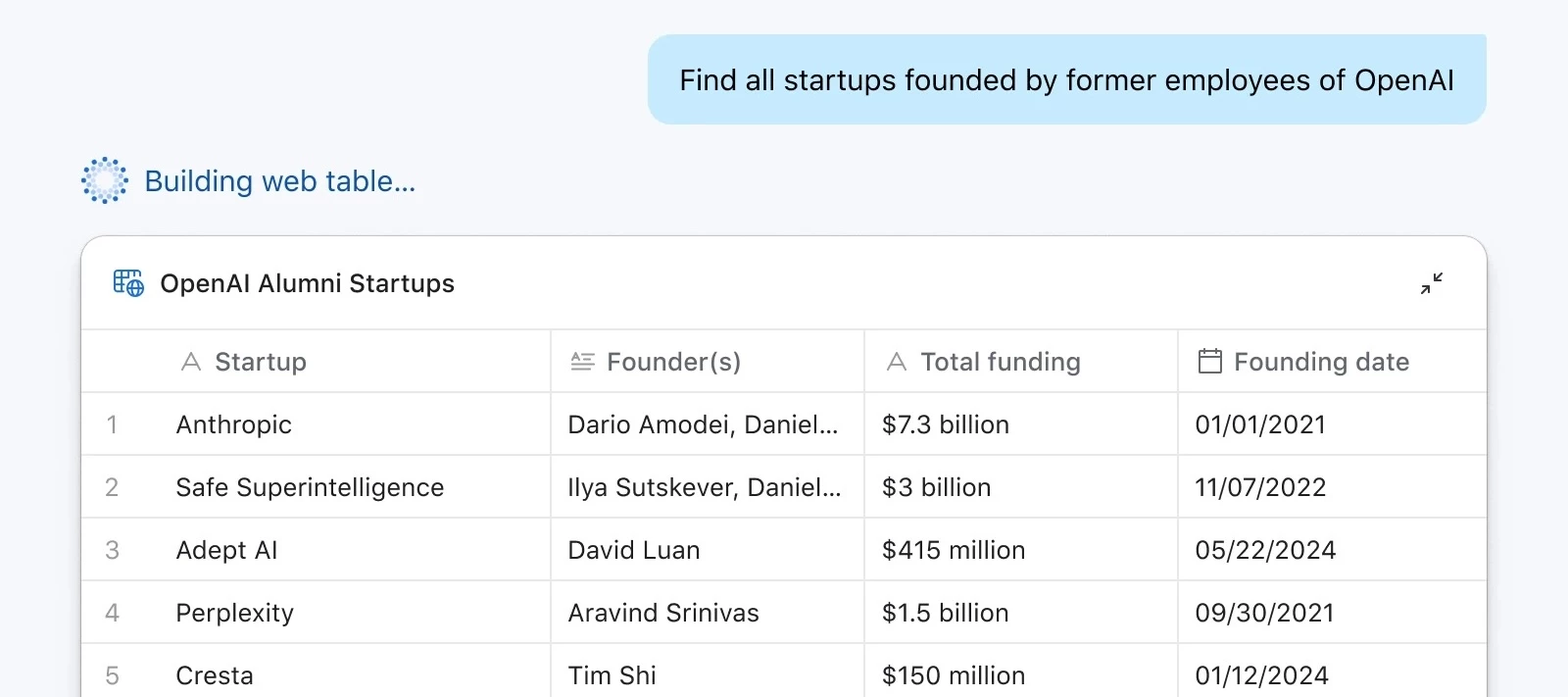
Hi everyone, Kenzo here from the Airtable Product team. Today we’re rolling out Web Tables in Omni (AI Labs) — a new way to research people and companies, and to power workflows such as sales prospecting, company research trackers, and recruiting outreach. Web Tables let you create structured datasets of people and companies from the web, directly in Airtable. This unlocks new kinds of apps you can build without manual data collection or cleanup, such as:Company Research Tracker – monitor startups, competitors, or YC companies with founder and funding details, then track them in your company tracker app. Example prompt: Find all Y Combinator companies founded since 2022 that are in the fintech or AI sectors. Recruiting Pipeline – find candidates, their roles, and recent job changes, then add them to your Recruiting base and link them to open roles. Example prompt: Find all software engineers in San Francisco who have recently left Stripe or Coinbase. Sales CRM – build prospect lists
Welcome to Change Makers, our series highlighting customer stories and builders making an incredible impact with Airtable. Today’s Change Maker was one of the winners of our MVP AI Build Contest, showcasing innovative use of Airtable AI. Meet Lauren, Director of Business Transformation at Kno2 🦸🏻♀️What’s your superpower at work?I can take a big, messy, chaotic process and figure out how to streamline it, usually in a way that’s both more human-friendly and automation-ready. Since the release of Airtable’s Omni and Field Agents, I have been uncovering even more use cases for AI, designing systems that not only work for everyone today but can also evolve and get smarter over time. 🌱 What’s a small change that’s had a big impact on your workflow?Building “decision-ready” views in Airtable. Instead of showing stakeholders everything, I curate it so the view answers one question or drives one decision. It saves hours of back-and-forth and basically removes the “I didn’t have the info”
Hello! I’m Ayesha, a Product Manager here at Airtable. We’re so excited to share an improvement to interfaces that will let you share some page types publicly in a read-only format. You can share a link to these pages or embed them in other websites. What are publicly shared interface pages? Most interface pages can now be publicly shared and can be accessed by a non-Airtable user without being logged in. These pages are read-only and your audience will be able to filter, sort, search, and expand details on your page. How do you create a publicly shared page? After you have published one of the supported page types, the share dialog will feature a new “Share Publicly” tab. Turning on the switch will enable public sharing using a unique link that is generated when the toggle is turned on. What does a public page look like? You can check out a real example at https://www.airtable.com/whatsnew!We’ve embedded a public interface page that shows our recent launches. Other comm
Welcome to Change Makers, our series highlighting customer stories and builders making an incredible impact with Airtable. Today’s Change Maker was one of the winners of our MVP AI Build Contest, showcasing innovative use of Airtable AI. Meet Alex, Senior Tools Manager at Airbnb ☕️ Coffee, tea, or something else entirely to fuel your workday?Coffee (usually too much). I've been trying to mix in some decaf but it's tough. 🕹️ If you weren’t in your current role, what would you be doing?Making video games or music, or both. But I'd probably still be tracking it all in Airtable. 🧑🏻💻 What’s the most surprising use case you’ve seen (or built) in Airtable?Gotta go with the OG W Vann Hall's community post where he created conditional linked records... before they even existed in Airtable natively. Such an exciting moment in Airtable building that really inspired me to push the limits. 🗯️ What advice would you give to someone just getting started with Airtable?Think of something you'd li
Hey Airtable Community, Did you know the first day of fall is September 22? Another fun holiday in September…Eat an Extra Dessert Day is TODAY, September 4th! So here’s a blog spotlighting our top contributors in August who I hope will treat themselves to an extra dessert today for being such amazing members of the community!In August, our Top Contributors provided 26 answers, 420 replies, and received 157 likes. And, at the top of the leaderboard, our top 5 earners cumulatively collected 3,303 points 🤯 Congrats to all and thank you for being an essential part of the Airtable Community! Top Solution Authors 🧠 *@airvues - 10 Answers Given @TheTimeSavingCo - 7 Answers Given @Alexey_Gusev, @Mike_AutomaticN, and @Tyler_Thorson - 3 Answers Given **@RedwolfSports, @Taha-Jiruwala, @CaitlenBerg, @DisraeliGears01, @Richard - Simplified Webhooks, and @will_from_cd - 1 Answer Given *Congratulations to @airvues for dethroning our usual top solutions authors for that first spot
Welcome to Change Makers, our series highlighting customer stories and builders making an incredible impact with Airtable. Today’s Change Maker was one of the winners of our MVP AI Build Contest, showcasing innovative use of Airtable AI. Meet Dominique, Data and Operations Director at HearstLab 🦸🏻♀️What’s your superpower at work?I’m surrounded by people who make it easy to do great work. I’ve had leadership that genuinely supports innovation, and I get to build for (and with) exceptionally brilliant people. I’ve also been lucky to work with companies I believe in, which is a huge motivator.Helping people do their best work feels meaningful and selfishly, building for great brains makes me better. It pushes me to think differently, stretch how I approach systems, and co-create tools I never would’ve reached alone. Especially now, as we bring AI into more of what we do, it’s an exciting time to be a builder and a translator.🗯️ What advice would you give to someone just getting start
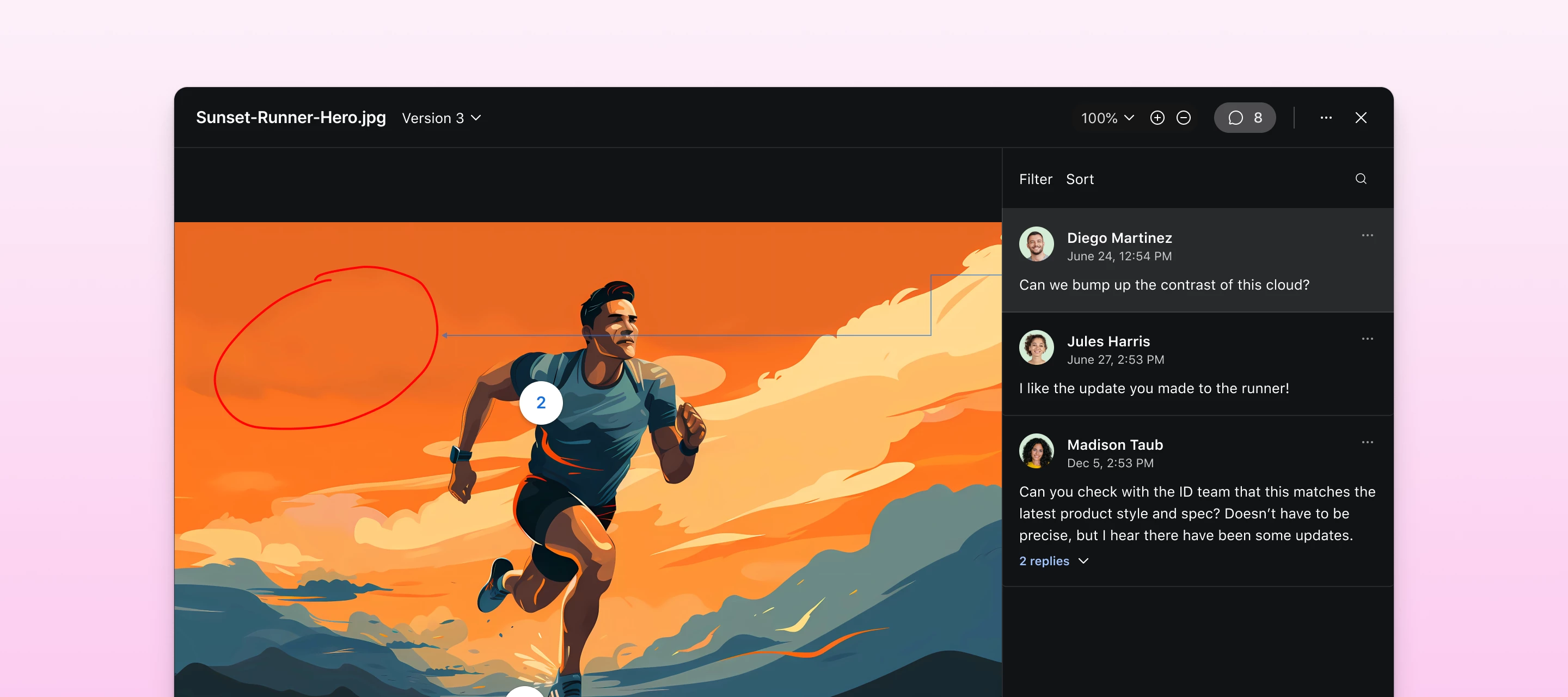
Hello Airtable Community! My name is @Akshar_Patel and I am a Product Manager here at Airtable. We're thrilled to announce a powerful new feature that will revolutionize how creative and marketing teams manage their review and approval workflows: Proofing. What is Proofing?Proofing provides an integrated workflow for creative and marketing teams to upload, version, review, annotate, and approve digital assets directly within Airtable—eliminating the need for external review tools.With this new feature, you can now combine the power of Airtable's project management capabilities with professional-grade proofing tools in one seamless experience. You can track versions, compare files side-by-side, add detailed annotations, and collect stakeholder feedback without ever leaving your Airtable workflow.We recommend using Proofing for key use cases like:Creative agency workflows - Marketing teams managing multiple client campaigns who need to track asset revisions and collect approval feedback
Hey Airtable Community!I'm @Zach from the Product Ops team at Airtable. Welcome to our (NEW!) quarterly Product Playback: a snapshot of what we're hearing from you and how we're responding.Thank you for sharing your ideas. In the past few months, you've submitted over 150+ ideas through our Product Ideas form. We know you've invested significant time providing this feedback, and we want to show you where it's landing. This post reflects the themes we're seeing most often and provides insight into what we're working on.About this post: We'll cover the most requested features, what we've shipped, what's in progress, and what we're considering. Our roadmap evolves based on customer needs, technical factors, and market dynamics, so plans may shift. But we want to keep you informed about our current direction.Ready? Let's dive into what you've been asking for and what we're building. First, a quick note re: the recent UI updates supporting our platform evolution.We've rolled out updates to
Hello everyone, I'm a product designer at Airtable. This quarter, our team is working on a number of improvements to Timeline view based on all the feedback we've heard (much of that from the community so thanks for the great ideas!). We're starting with improvements to the way we render labels. Previously labels were cut off very often, whenever records were too short or just off the edge of the viewport. This meant reading data required a lot of zooming, scrolling, and hovering. Today we're making this much easier by releasing three key updates: Labels now stay on the screen as you scroll, so you can continue to read them. Labels overflow, so so they're visible even when the records are very short or zoomed out. Records beyond the fold are now pointed to by arrows, so you can preview and navigate to them. Jump into one of your Timeline views today to try these updates yourself. We hope you enjoy these improvements, but please continue to share your feedback here as well as y
Hey Airtable Community, Is it back to school season for you? If so, sending thoughts and prayers as you juggle those early morning pickups and after school activities with everything else going on in your life! And if any of our top contributors from July are parents/caregivers…please let us know how you do it all on top of being such outstanding members 💪🏼 Reminder: When recognizing our Top Contributors, we look at the quantitative data (e.g. likes received, answers given), as well as the quality to make sure everyone follows our Community Code of Conduct and Guidelines in their activity. So without further ado… In July, our Top Contributors provided 28 answers, 576 replies, and received 232 likes. And, at the top of the leaderboard, our top 5 earners cumulatively collected 4,311 points 🤯 Congrats to all and thank you for being an essential part of the Airtable Community! Top Solution Authors 🧠@TheTimeSavingCo - 15 Answers Given @ScottWorld - 5 Answers Given @Mike_AutomaticN - 4
Hi Airtable Community! I'm Matt, a Software Engineer here at Airtable. We're excited to announce some new features of number fields that give you more control over how numeric data is formatted and abbreviated. To access these updates, create a Number field or configure an existing Number field.What's included in these updates?Format numbers for different languages. Using the new “Thousands and decimal separators” setting, you can format numbers automatically based on users' language preferences with the new “Local” option. For example, an English-speaking user sees 1,234.0 while a German-speaking user sees 1.234,0. You can also choose a specific format that applies to all users regardless of language preferences. Support for additional languages and regions will be available over the coming weeks.Control whether thousands separators are shown. You can choose to display a number or currency field with thousands separators (1,234,567.0) or without (1234567.0).Abbreviate large numbers. I
Hey Airtable Community, Long time no see! Can you believe that we’re already halfway through 2025? While time flies, let’s take a moment to pause and celebrate the folks that made this community even better last month 🎉Reminder, top contributors are our outstanding members who elevate the Airtable experience for all by imparting knowledge and bringing a spirit of positivity and encouragement to the community. When recognizing our Top Contributors, we look at the quantitative data (e.g. likes received, answers given), as well as the quality to make sure everyone follows our Community Code of Conduct and Guidelines in their activity.In June, our Top Contributors provided 17 answers, 541 replies, and received 147 likes. Congrats to all, and thank you for being a part of the Airtable Community! Top Solution Authors 🧠@Mike_AutomaticN and @TheTimeSavingCo - 9 Answers Given @ScottWorld - 3 Answers Given @BuildForAT - 2 Answers Given @DisraeliGears01, @Alexey_Gusev, @stagandforge -
Hello! I’m Ayesha, a Product Manager here at Airtable. We’re so excited to announce that we now have Portals available in Beta for customers to unlock guest access for their organization. What are Portals and why would you use them? With Portals, you’ll be able to invite users outside of your organization as guest users to your interfaces. These guest users will see a custom sign-in screen and be able to collaborate inside your interfaces together. We recommend using Portals for key use cases like: Client portals Ex: A marketing agency giving their clients real-time access to project updates and deliverables Vendor management Ex: A plumbing supply distributor who works with major appliance brands and needs to centralize vendor info Customer support Ex: A digital product organization who is giving customers a way to see their roadmap and provide suggestions How do you get access to the beta? If you’re on a Team, Business, or Enterprise Scale account, please v
Hello! I'm Phil and I'm a Product Manager at Airtable. I'm excited to let you know about some visual design updates we've made across the Airtable product (which some eagle-eyed members of the community may have already noticed!) We released a number of visual updates in the last day with the goal of making it easier and more intuitive for you to build powerful apps that are not only delightful to use but impactful as well. Most of these changes have rolled out in the last day, and here's a summary of what's changed visually:Fonts used for headings in Views and InterfacesIconsButtons and form elementsCharts in InterfacesComments in Interfaces (coming soon)Color palette used for Base headers and Single select optionsThe updates to colors are notable, and I want to highlight why we've made these changes. We adjusted our colors because many of the existing colors are considered "inaccessible" when text is displayed on top of them. This means customers with visual impairments ma
Hi everyone! Update 2022/11/02 - The new time zone formatting options for date time fields are now generally available! We’re excited to announce a new beta feature that allows you to specify a display time zone of your choice on date fields that include time and formula fields that output a datetime value. Once you specify a time zone for a field, this time zone will be visible and used for all collaborators. We’ve heard your feedback that time and time zones can be tricky to manage, and we hope that being able to choose from a broader list of global time zones can make collaborating across time zones much easier and clearer for you and your teams. You’ll only be able to use these field-level time zone settings in your base if you’ve signed up for the beta and you can sign up for the beta via this form. As you’re trying out the feature, please submit any feedback/issues here. Read on for more information! For datetime fields, you can access this feature by going to the field configur
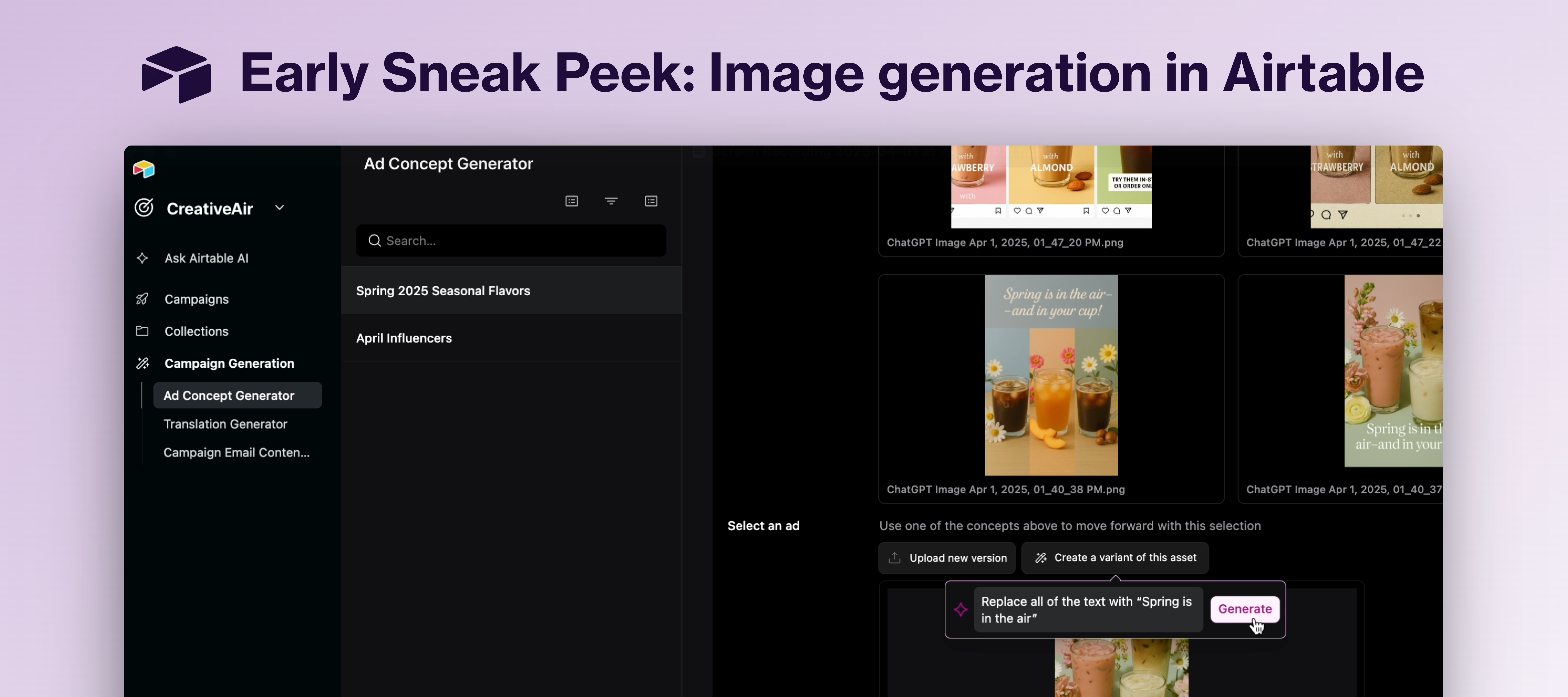
Hey Airtable Community! I'm Ayesha from the Product team, and we're pulling back the curtain in one of the earliest previews we’ve ever done. We just couldn’t hold back our excitement here to show you how we’re about to transform how marketing and creative teams work forever. 🔥 Focus on creativity, not repetitive tasks We've been watching the mind-blowing advancements in image generation and asked ourselves: "How can we take advantage of this to save our customers time and money?" The answer is our new prototype that will eliminate tedious work and supercharge your creative capabilities: In this demo, you can see how marketing teams could:Track work around campaigns, store assets, and more Use this system of record to generate ad concepts with AI Generate potential ad ideas based off a campaign brief and past campaigns Create assets to visualize these ideas and pass in variants you want to try Edit attachments directly to make quick changes with the help of AI Save time in your wo
Already have an account? Login
No account yet? Create an account
Enter your E-mail address. We'll send you an e-mail with instructions to reset your password.